Credit, Refund, or Neither: Settling Up With an Owner

When an owner books a six-night stay and pays a deposit by card, the stay can end early. If the dog goes home after two nights, the final bill may come to less than the deposit. That leaves some money at the front desk that belongs to the owner, and your team wants to get it back to them in the right way.
It might seem like a small detail, but it's actually pretty important. If an owner expects the refund to go back to their card and instead sees a credit balance, it can feel disappointing, and we totally get that. Plus, not every situation is handled the same way at Petsoft. So here's a quick look at the four scenarios where money goes back to an owner, who makes the call in each case, and what you can expect today.
When an owner cancels
When an owner decides to cancel, the cancellation rules determine how much money is refunded. If you'd like to learn more about deposits, check out our post on deposits and the Help Center page on deposit policies. Here is only the money.
On the staff Cancel page, you'll see details like the Deposit Paid, the Refundable Amount, and the specific cancellation rule that applies, which says that reservations canceled within a set number of days of arrival are refundable at a set percentage. You don't choose credit on that page. The refund goes back to the original payment, normally the card. Petsoft issues store credit on its own only when the money can't go back: a retired terminal, an expired card, or a card the issuer will never approve. A deposit recorded from QuickBooks is left for you to refund there.
There is one exception. When the rule refunds less than the whole deposit, a checkbox allows a full refund, overriding the standard rules. It's locked unless you have the Grant Refunds permission. If you don't, a manager who does can use Authorize Full Refund Override and sign in at the pop-up to turn it on. The checkbox doesn't ask for a reason. Decide in advance who may use it and where the reason gets written down.
When the deposit is bigger than the bill
Say the deposit was $100.00 and the final bill comes to $40.00. On the invoice page, an alert says a deposit "has been made for this reservation and can be applied to this invoice," and the Apply button applies only what the invoice needs.
When the deposit is larger than the bill, two radio buttons show up underneath: "Purchase $X in store credit" and "Refund $X to" the card. Store credit is already selected when the page loads, so if someone clicks Apply without reading it, the difference becomes credit.
The card option shows only when the deposit was paid by card. Choosing credit creates a separate invoice, "Purchase of Store Credit," which the deposit pays, and the owner's store credit goes up. Choosing the card refund tries to send the difference back to the card the deposit came from. If that card's terminal has been retired, Petsoft asks you to confirm that the original payment will be refunded to store credit instead.
If you try to refund store credit bought with deposit funds later, Petsoft stops with "Store credit purchased with deposit funds cannot be refunded."
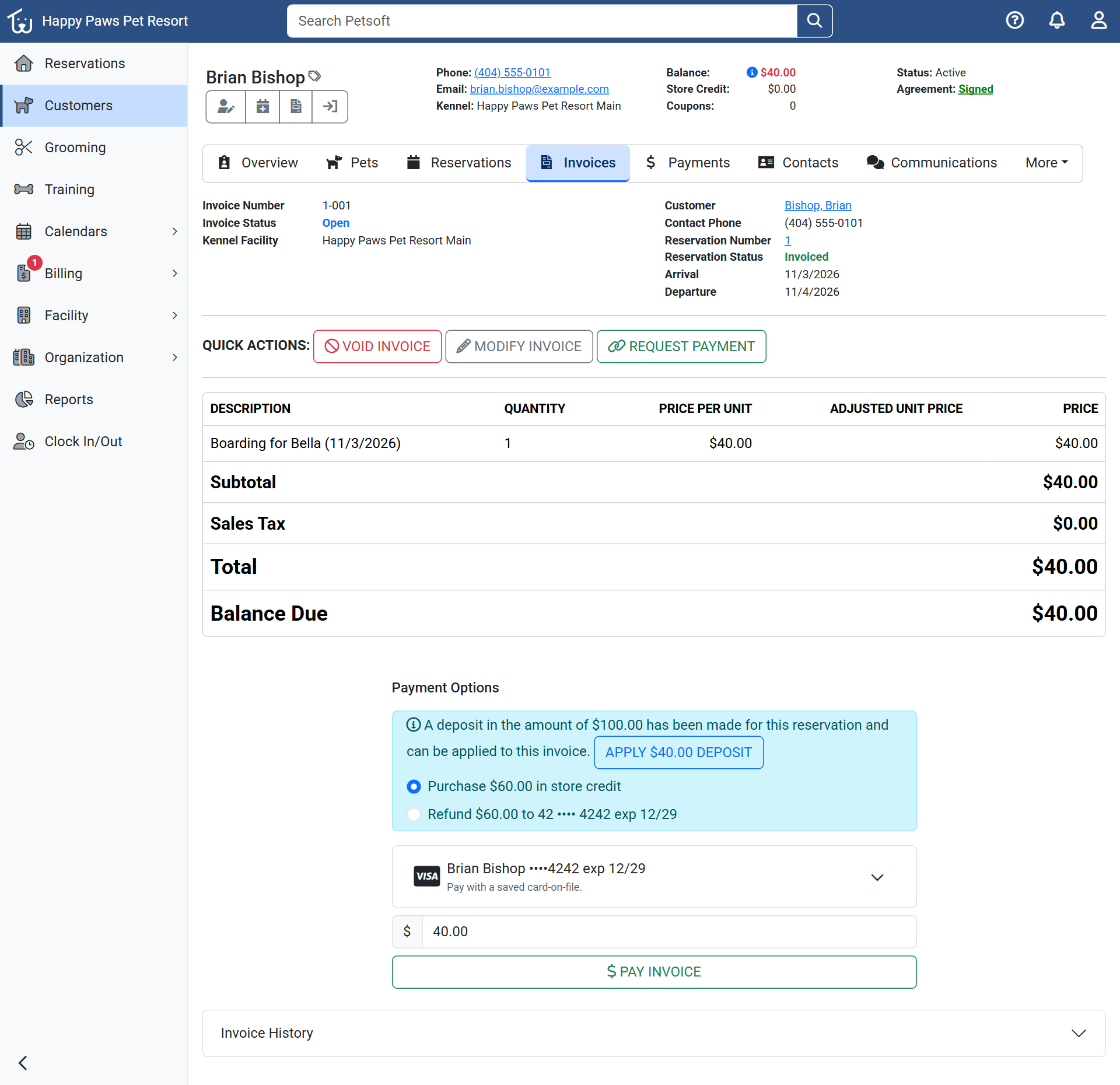 A $40.00 invoice against a $100.00 deposit. Store credit is selected, and the card refund is listed because the deposit was paid by card.
Refunding an invoice later
Sometimes, a week after payment, a customer comes back and asks for a refund. To process it, you need the Grant Refunds permission, and the Refund Invoice button is right on the invoice.
When you open the page, any earlier refunds are listed first under Existing Refunds, so you can see what was already given back. Below that are the Refundable Line Items, each with its own checkbox.
A line refunds in full, so you can't give back part of one. To give back less, select fewer lines. A line that was already partly refunded gives back only what is left. If the invoice includes a reservation deposit, the refund amount follows the cancellation rules. There is a checkbox that lets you bypass those rules and refund the whole deposit if needed.
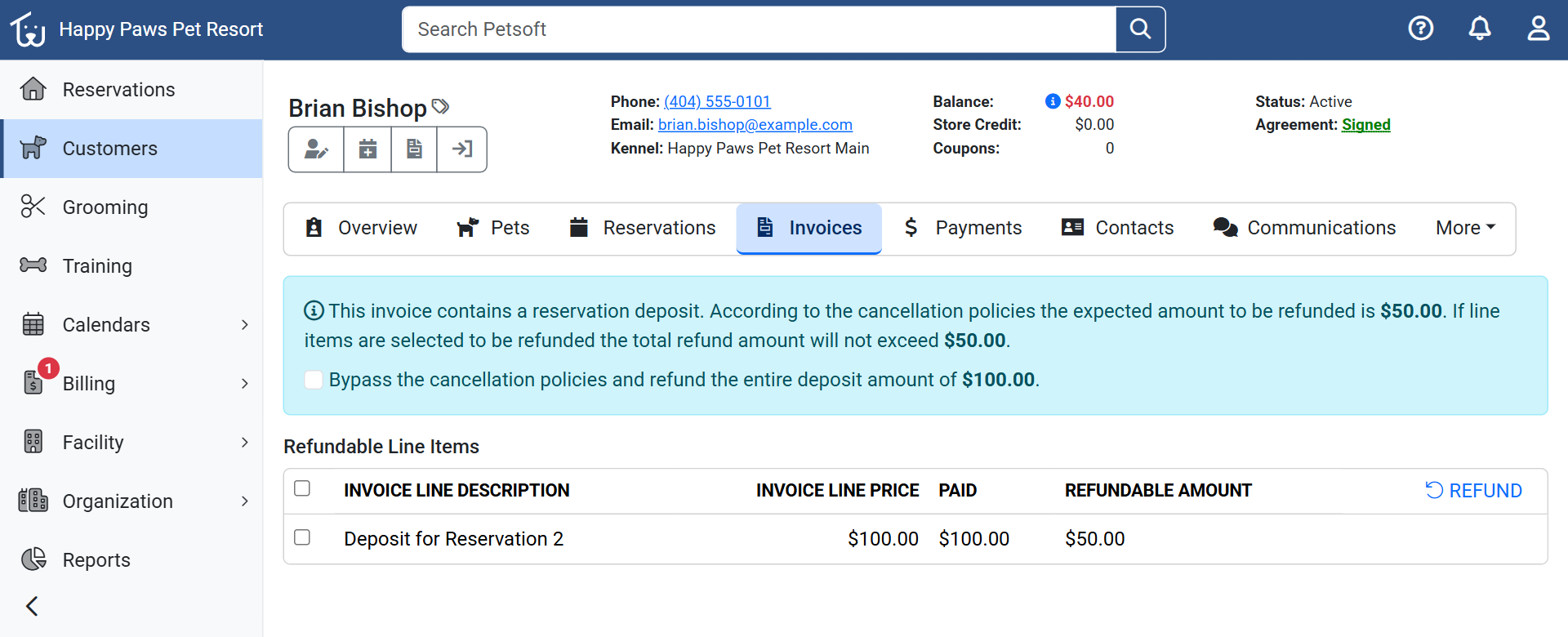 The Refund Invoice page for the $100.00 deposit on a different stay, Reservation 2. The rule allows $50.00, and the checkbox offers the full $100.00.
What to do when the card terminal is no longer available
If the card terminal the customer paid on has been retired, Petsoft can't process the refund back to that card. You'll see a yellow alert on the Cancel page letting you know. The Refund Invoice page also asks you to confirm that "any affected refund will be converted to Store Credit, and not returned to the original account." If only part of a refund is affected, a Refund Unavailable box offers Accept or Go Back.
The customer ends up with store credit, not money on their card, so tell them before you click.
Where store credit goes
At Petsoft, store credit is tracked for each customer and each facility individually. So if a customer uses two of your facilities, they have a separate store credit at each one. You can't use store credit to purchase more store credit, and Petsoft makes that clear with an error message. When your staff create a reservation that includes a deposit and use the card on file, Petsoft applies any available credit first and then charges the card for the remaining amount.
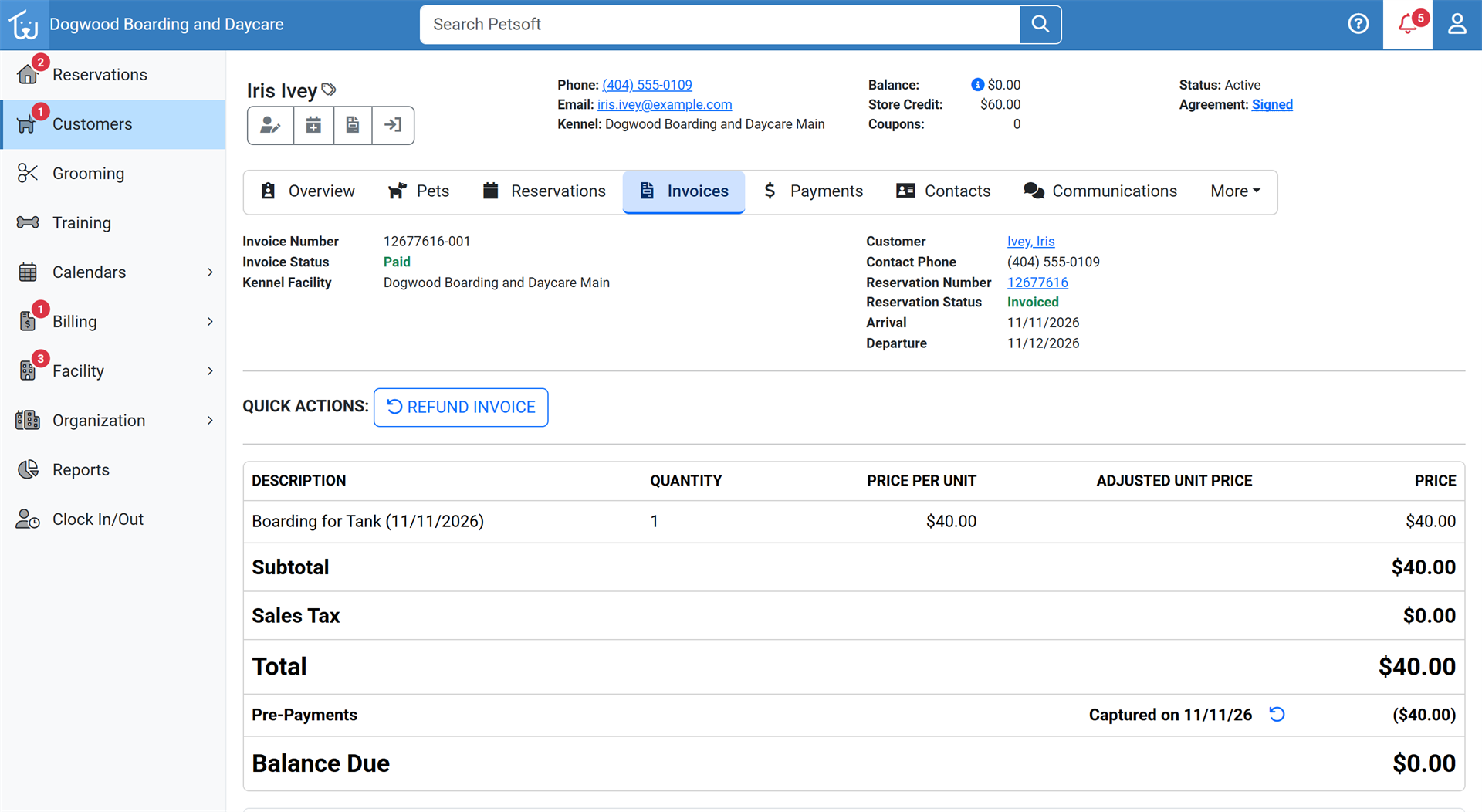 The same invoice after Apply with store credit selected. It is Paid, and the header shows Store Credit of $60.00.
Make decisions before the owner asks
We recommend returning the funds to the original payment method unless the customer specifically asks for store credit. If you expect the owner back soon, ask whether they would rather keep it as credit. Whatever you choose, say it out loud before you finalize everything: "I'll put this back on your card" or "This will be credited to your account at this facility."
Do that before anyone clicks Apply on the overpaid invoice. Credit is already selected there, and once it is bought with deposit funds, it can't go back to the card.