A Smoother Check-In Starts Before Arrival

A dog arrives for a four-night stay. The rabies certificate expired in September. Nobody has signed the agreement for the second dog. The deposit is still unpaid, and the owner's flight leaves in two hours.
None of that is unusual, and all of it could have been found out days earlier.
Last time we wrote about what the front desk needs from its software when the lobby is full. Some of that rush can be avoided if the records, agreements, and deposits are settled before the pet gets there.
Vaccination records
Start here, because a missing record is hard to settle with the owner standing at the counter. Many states require a kennel to keep proof of its dogs' vaccinations (AKC). Whatever your own rules are, you want the record in the system before the visit, so the owner isn't scrolling through their phone for it at the counter.
In Petsoft you choose which vaccines you require and how many days before an expiration date it should start warning. The Help Center suggests thirty, enough time for an owner to get a vet appointment. A required vaccine that is missing or close to expiring puts a Vaccine Warning tag on the pet. If your reminders are on, an owner with a completed stay and a required vaccine that has a date on file also gets reminder emails as that date approaches.
Owners can upload the record themselves in the Pet Parent Portal. A pet added there lands in a review queue, where someone on your team opens the document, enters the dates, and approves the pet.
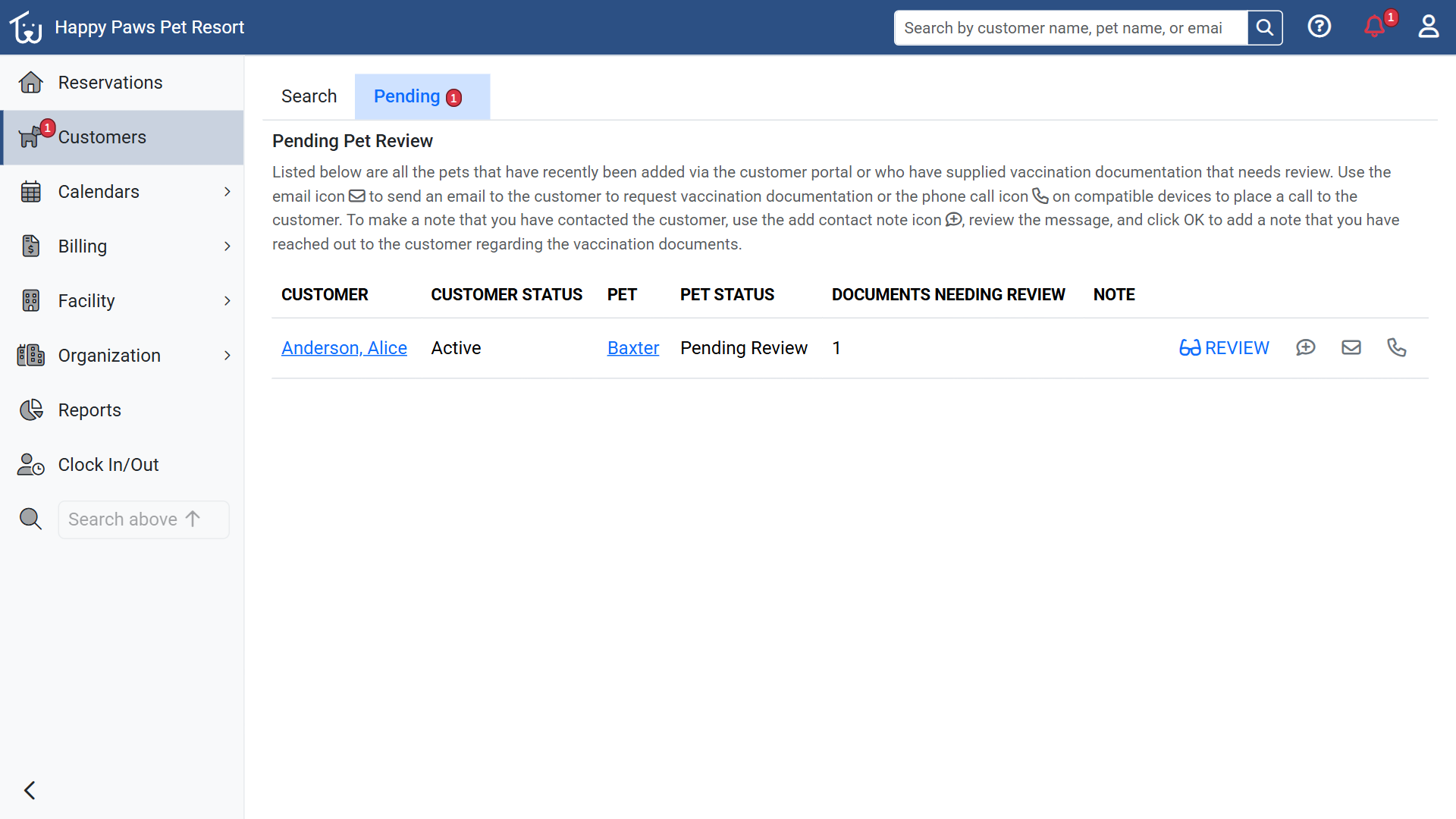 A pet added through the portal, waiting for review with one document. The Pending tab and the Customers menu both show the count.
If you turn on the Require Pet Review Before Booking rule, an owner can't reserve a pet in the portal until the review is done, though staff still can. An expired or expiring vaccine never blocks a reservation at the moment: the pet gets the tag, the owner sees a warning while reserving, and your staff can still make the reservation. If you want a hard rule, your staff have to apply it themselves.
The agreement
Owners accept your Terms of Service when they sign up for the portal, or at first login if you keep agreements per pet, and again whenever you publish a new version. They can't reserve in the portal until they have. You choose whether one acceptance covers the household or each pet needs its own, and with per-pet agreements, adding a dog later can prompt the owner again.
For customers you set up by phone, the customer header shows Agreement: Signed or Not Signed. You can check that the day before.
Saving a change to your Terms of Service publishes a new version, and every owner has to accept it again before their next reservation, even if all you did was fix a typo. Check the live preview below the editor before you save.
The deposit
Each service can have its own Reservation Deposit policy: a fixed amount or a percentage of the estimated total, with a separate policy for holidays. When staff make a reservation that needs a deposit, it is held as Pending Deposit for a short time (10 minutes by default) and removed if the deposit isn't paid. In the portal, the owner pays at the Review step, which shows the amount and the saved card it will be charged to, and uses any store credit first. The same step links to the Terms of Service and the Cancellation Policy. If your facility doesn't take cards online, the portal tells the owner the deposit is collected at drop-off.
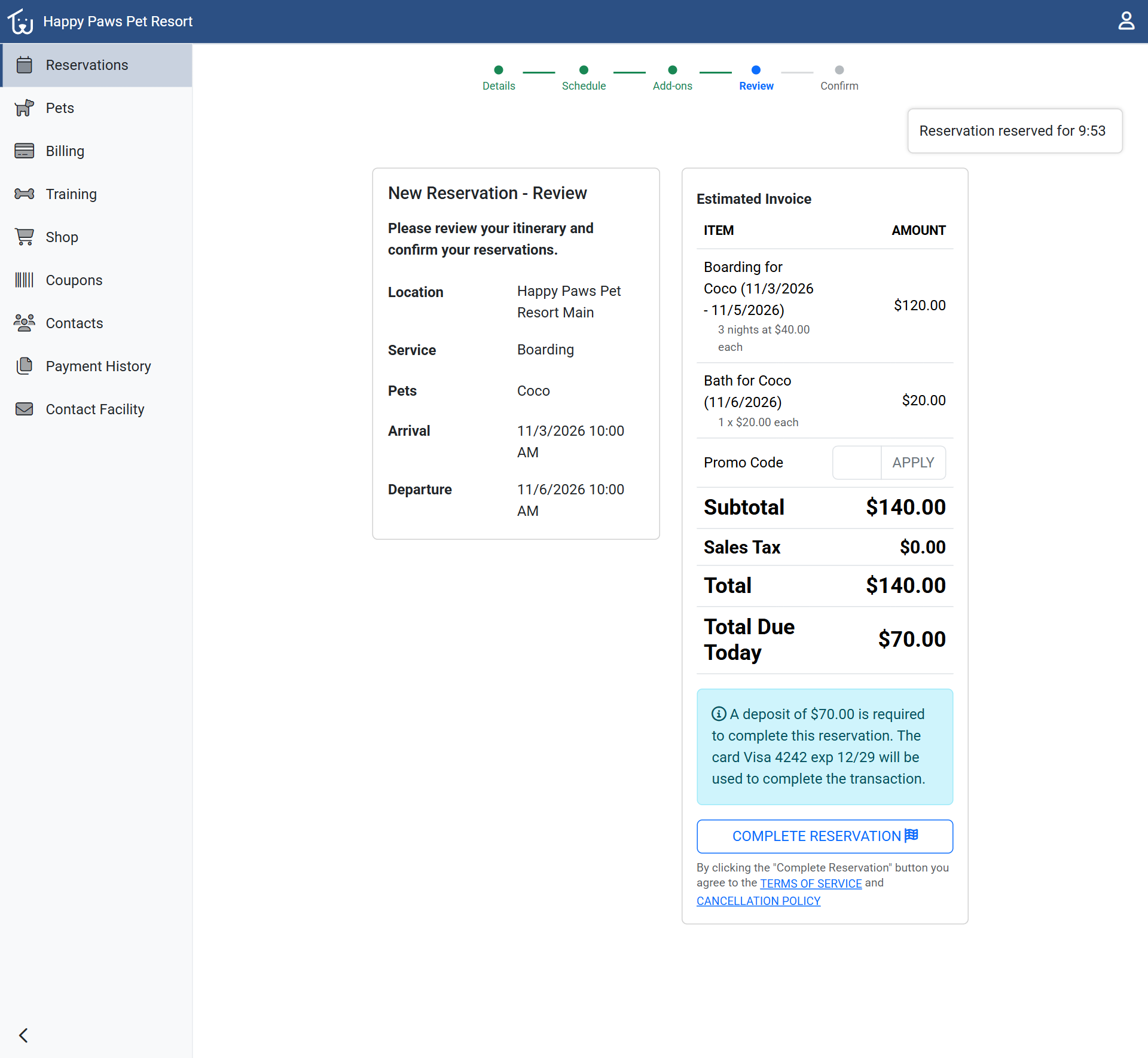 The portal's Review step for a boarding stay with a Bath add-on, with the deposit note under the totals.
If a deposit will be collected at drop-off, tell the owner. The trouble starts when the owner thinks it was paid and you expect it at the door. For reservations you take by phone, say what the portal would say: how much, when, and what happens if they cancel.
Care notes
Once a reservation is made, ask what has changed since the last visit. Allergies on the pet's profile and any note marked Display On Kennel Card (other than internal notes) print on the Kennel Card, so an update the owner emails you only helps once it has been copied onto the profile. Check that an emergency vet is on file, too, since that is who you call when you can't reach the owner.
Try it on next week's arrivals
Open the Arriving tab on the reservations board and set the date to a week from today. Look for the red icons beside each pet and customer, and hover for the name: Vaccine Warning, Agreement Not Signed, and, if you have turned on the missing-card icon in your rules, No Card on File. Write down which of those would have cost you time at the counter.
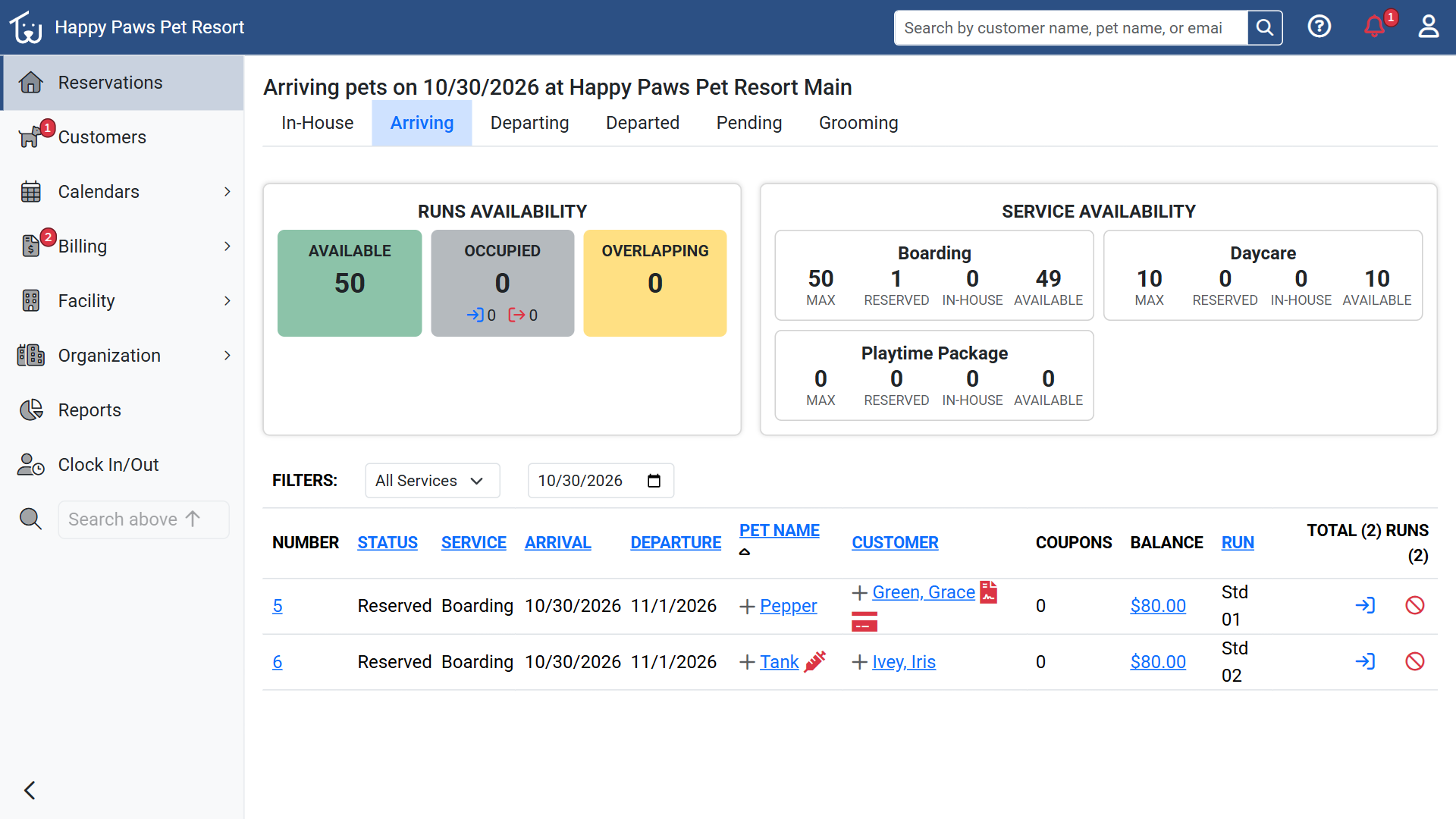 The Arriving tab for a date a week out. The icons beside Pepper's owner mean the agreement is unsigned and no card is on file, and the syringe beside Tank is a Vaccine Warning.
Do it weekly for a few weeks and fix whatever turns up most often first.
The Help Center covers the settings mentioned here: vaccination requirements, agreements and waivers, and deposit policies. If something at your counter keeps tripping you up, tell us about it.