Who Gets the $11 Tip When an Owner Says "Keep the Change"?

A pet owner picks up their dog after a boarding stay and a grooming appointment. The balance is $89, and they hand over a $100 bill and say, "Keep the change."
That's an $11 tip, and you have to say whose it is. The bill, a made-up one, was a $40 night of boarding, a $45 groom and three $8 dental chews, $109 in all, with a $20 deposit already paid.
We'd give the groomer the groom's share and put the rest in a pool, split by hours among whoever worked that day. An owner who says "keep the change" doesn't say which line the tip is for, so the rule has to work without asking.
The other rules have a point. Give the groomer all eleven, and the person who cleaned the run and the one who rang up the chews get nothing, though those two lines are $64 of the $109. Pool the whole tip, and the $45 groom counts for no more than the chews. An even split is simpler than hours, but a four-hour shift shouldn't earn what an eight-hour one does.
This is a policy you set, not something Petsoft does for you. The Tip Report shows where a tip came from, and it doesn't divide the pool or pay anyone.
Where the $11 goes
Here's how the Tip Report attributes it across the charges the payment covered:
| Department | Tip amount |
|---|---|
| Grooming | $5.56 |
| Retail (dental chews) | $2.97 |
| Boarding | $2.47 |
| Total | $11.00 |
You might expect boarding to get more than the chews, since the boarding charge was $40 and the chews $24. But the report uses what this payment covered, and the $20 deposit had already paid half of that night. A deposit makes the tip smaller for whoever looked after the dog.

Tips by department in a demo organization.
The groom's $5.56 is tied to the employee assigned to that service. The other $5.44 reads Not assigned, and under this policy that's the pool.
Run the report again later and it recalculates from whoever is assigned to a service at that moment. Change the groomer on an older appointment and the earlier tip moves with it, so check assignments and keep your own record of what you actually paid out. The report is on paid plans, and staff other than the Account Owner need the View Tip Report permission and the report in one of their report groups.
Taking the tip at the counter
An Account Owner has to turn on Track tips in Organization Settings first. Then enter $100 in Cash Received, and the page shows $11 in change with a Keep the change as a tip button. Select it and take the payment. The cash payment has to cover the full balance for the change to count as a tip.
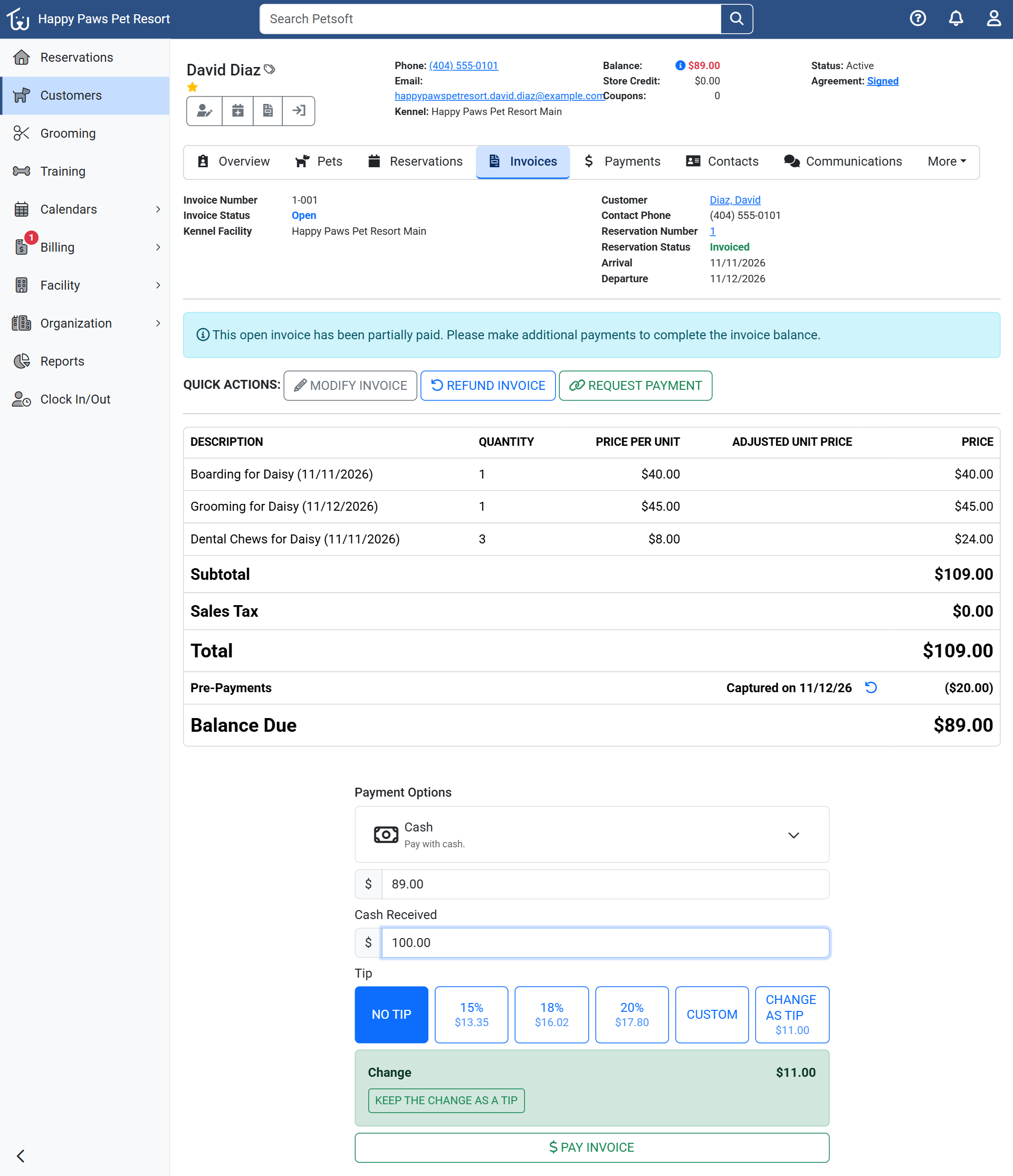
Cash checkout with the $20 deposit already deducted. Demo organization.
Card tips work differently. They come only from a physical payment terminal with its tip prompt turned on, and turning that on takes a support ticket.
Write the rule before the first tip
Put the policy in writing before tips start coming in: who takes part in the pool, how hours are counted, and how adjustments are handled. Federal rules limit who can share in a pool and bar an employer from keeping any part of employees' tips, and a stricter state rule applies when there is one, so read the Department of Labor's fact sheet on tipped employees and check your state's rules before you set one up.
Then tell your groomer in the first week which part of a tip is theirs and which part goes in the pool.