Why Dogs Get Upset Stomachs on Vacation

Friday, 7:52 a.m. An owner arrives with Juniper, a Lab mix vibrating with joy, and says, "I totally forgot her food. Can she just have yours?"
Sure, it's the easiest yes at the desk. It also puts her on a new food with no transition.
What the sources say about switching
The AKC says switching a dog's food abruptly can cause vomiting, diarrhea, and a decreased appetite, and it suggests spreading the change over 5 to 7 days (AKC). Cornell's vet school has a shorter plan, four days, and says dogs with sensitive stomachs may need a longer, more gradual swap (Cornell).
Cornell's plan starts at 75 percent old food and is half and half by day two. A three-night stay on house food is 100 percent new from the first meal, with no gradual switch at all. Nothing in those sources is about boarding, so that comparison is ours.
Cornell also says a too-sudden change may cause diarrhea that usually goes away on its own, and to call the vet if it lasts more than a day or two or comes with other symptoms. Your team can pass that along at pickup. Then the owner isn't guessing on Tuesday.
What to do with that
Ask what the dog eats at home when you take the reservation, not at the door with a leash in your hand. Tell owners to bring their usual food, since a short stay isn't long enough to switch. If you sell house food, say which one it is, so an owner can answer "oh, she's on that already" before the drop-off scramble. When the bag really was forgotten, one sentence your desk uses every time keeps the choice with the owner: "We can feed her ours, but it's a change from what she eats at home, so her stomach might complain. Want to run home for hers?"
None of that needs software. Where Petsoft comes in is the notes.
Where the feeding notes live
On each pet's page in the portal, owners get a Feeding Instructions box that asks for amounts on an AM/PM schedule, and a Dietary Requirements box that asks for things like "no chicken." Both are ordinary pet notes, and neither prints on the Kennel Card by default. A note prints only when someone on your team opens it on the pet's Notes tab and ticks Display On Kennel Card. The card also has its own Feeding Instructions line, filled from a staff note of type Feeding Notes, and a note of type Internal Notes never prints, ticked or not.
The Kennel Card is for boarding reservations. Daycare reservations don't have one, but a reservation row on the dashboard has a Notes button that shows the pet's notes.
So when a boarding reservation comes in, open the pet's notes and tick Display On Kennel Card on anything that changes what the dog eats.
Adding house food to a stay
House Food is a product marked with the House Food option in your catalog. Your team adds it with the Food checkbox on the Advanced Boarding Reservation screen, or with the Add House Food button on the reservation page, and a blank quantity covers the entire stay. Nothing compares it with what the dog eats at home or warns anyone that a switch is coming. The Help Center page on House Food has the setup.
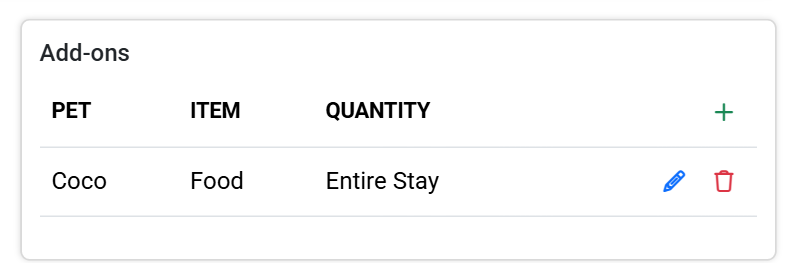 The Add-ons card after House Food was added for Coco. The quantity reads Entire Stay.