Protect Your Revenue
Petsoft does not have a standard cancellation policy. You set your own cancellation policy. You decide the deposit amount. You also decide how much notice a customer must give to receive a refund.
Deposits protect you from customers who cancel late or do not arrive. Different businesses handle deposits in different ways. For example, a grooming shop may charge the full price in advance. If a customer misses the appointment, the shop loses that time slot. A boarding kennel may charge a smaller fixed amount instead. The customer is booking a longer stay. Petsoft supports both options.
Each service has its own deposit policy. Go to Services > Facility Services, open the service, and scroll to the Deposit Policy section below the prices. You need the Manage Facility Services permission to see Services in the navigation.
How Deposits Work
If a service requires a deposit, the reservation status is Pending Deposit. When the customer pays, the status changes to Reserved. This rule applies to stays that your staff book. It also applies to stays that customers book in the portal.
A deposit policy belongs to one of the service's rate periods, the same dated ranges that hold the service's prices. See Services & Rates to learn how rate periods work. Petsoft uses the policy from the rate period that covers the reservation's dates. If no rate period covers the stay, Petsoft uses the period in effect today.
When you start a new rate period, Petsoft copies the deposit policy from the period before it, along with the prices. To plan a change, such as stricter holiday deposits before a busy season, start a new rate period on the change date and edit its deposit policy. Earlier periods keep their own policy.
The Two Calculation Methods
| Method | How it works | Best for |
|---|---|---|
| Fixed Amount | A fixed fee, $0.00 to $2,000.00 | Daycare or short stays where the total bill is predictable |
| By Invoice Percentage | A percentage of the estimated total, 0% to 100% | Boarding stays where the bill varies by length |
Most facilities use a mix of methods. For example, a fixed amount for daycare and a percentage for boarding. Because each service has its own policy, you set the method per service, per facility. Each policy has a Standard Deposit for normal dates and a Holiday Deposit for reservations that overlap a date you have flagged.
A deposit is never more than the total bill. For example, if the fixed deposit is $60.00 and the stay costs $40.00, Petsoft charges only $40.00.
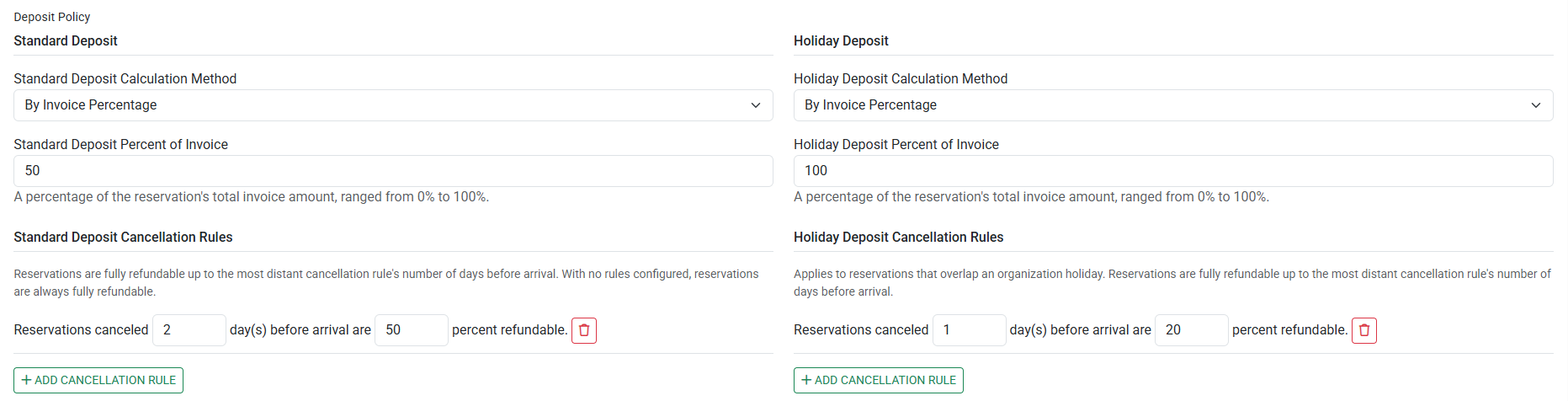
Setting a Policy
- Go to Services > Facility Services and open the service.
- In the Rate Period dropdown, pick the period the policy applies to.
- In the Deposit Policy section, choose the Standard Deposit Calculation Method. Leave it at No deposit required if the service does not need a deposit on normal dates.
- Enter the matching Standard Deposit Fixed Amount or Standard Deposit Percent of Invoice.
- You may add Cancellation Rules. They appear after you choose a calculation method. See the Cancellation Rules section below.
- Repeat steps 3 to 5 for the Holiday Deposit.
- Select Save.
The Holiday Deposit is a complete, independent policy. It has its own method, its own amount, and its own cancellation rules. It applies whenever a reservation overlaps a date on your Holidays list. Keep that list current.
If you leave the Holiday Deposit at No deposit required, reservations that overlap a holiday need no deposit, even when the Standard Deposit is set.
Cancellation Rules
Each rule is written as a sentence:
"Reservations canceled ___ day(s) before arrival are ___ percent refundable."
Select Add Cancellation Rule to add a tier. You may add as many tiers as you need. Each rule must use a different number of days. The number of days before arrival cannot be more than 365.
Read each rule as "at or within N days." Each rule covers a range of days. This range runs from one day after the next-longer rule's number of days, up to its own number of days. For example, if one rule is 7 days before arrival with 50% refundable, and another rule is 2 days before arrival with 0% refundable:
| Days before arrival | Refund |
|---|---|
| 8 or more days | 100% |
| 3–7 days | 50% |
| 0–2 days | Nothing |
You cannot make a long-lead cancellation non-refundable. Anything beyond your longest-dated rule is always 100% refundable. Petsoft states this on the form itself: "Reservations are fully refundable up to the most distant cancellation rule's number of days before arrival. With no rules configured, reservations are always fully refundable."
If you want a charge for early cancellations, your rule with the highest number of days must set that charge. You cannot configure a range beyond your highest-numbered rule.
Two more rules worth knowing:
- Tiers are counted in whole days, using your facility's time zone. Tiers do not use hours. The rule's input field is labeled
day(s). For example, 48 hours before arrival equals a 2-day rule. - A reservation with status Pending Approval is always fully refundable. This rule applies even if your cancellation policy states otherwise.
What the Customer Sees When They Cancel
The cancellation page shows the outcome clearly. For example:
"The cancellation policy for [your organization] for [service] states that reservations cancelled within 3 day(s) of arrival are 50% refundable. $30.00 of the $60.00 deposit will be refunded."
Making an Exception
Sometimes a cancellation policy does not fit the situation. For example, a customer's house may flood, or a pet may become sick. Petsoft lets you make an exception.
On the cancellation page, staff with the Grant Refunds permission can select this checkbox:
"Refund the full deposit ($60.00), bypassing the cancellation policy."
If staff do not have that permission, a manager can select Authorize Full Refund Override and enter their own login to approve the refund. This override is all-or-nothing. You cannot enter a custom refund amount.
Daycare Coupons Override Daycare Deposits
If daycare coupon packages are enabled, Petsoft skips the daycare deposit rules. Petsoft shows a warning message on the form. Instead, a single deadline applies:
You must cancel by 5:00 PM the day before the reservation date, or Petsoft charges the daycare fee. If you cancel before that time, Petsoft issues a full refund. If you cancel at or after that time, Petsoft does not refund the deposit, and the customer loses the coupons used. The cancellation tiers do not apply to daycare coupons.
To use deposits for daycare, turn off Require Coupons For Daycare Reservations. You can find this setting under Organization > Settings > Rules.
When Petsoft Does Not Charge a Deposit
A deposit is $0.00 in three cases:
- The service is daycare, and daycare coupons are enabled. See the section above.
- The service's rate period has no deposit policy, or its calculation method is No deposit required.
- The configured amount is $0.00.
Refunds and Store Credit
Petsoft converts a deposit to Store Credit only when the payment device that took the deposit is now retired. Petsoft cannot credit the original card once its payment device is retired. The store credit rule does not depend on how late the customer cancelled. Petsoft asks you to confirm the conversion before it happens.
See Store Credit & Refunds to learn more.
Editing and Removing a Policy
- A rate period that has already ended shows its deposit policy read-only, like its prices. To change deposits going forward, start a new rate period.
- To stop requiring a deposit, set the calculation method back to No deposit required and select Save.
- Deposits already collected do not change when you edit a policy.
- Deleting a rate period also removes its deposit policy.
Related Articles
Still stuck?
Our team is happy to help. Reach out and we'll get you back on track.
Not a Petsoft customer yet?
These are the same guides our customers use. Prices are on our site, and the demo is a working account with sample pets and bookings already in it.