Discounts & Surcharges
Rather than pricing every combination of pet count, tag, and time of drop-off as a separate rate, you set one base price for a service and then layer discounts and surcharges on top of it. This is what makes offers like "10% off for a second pet, plus a military discount, plus a surcharge for early drop-off" possible without building a rate table for every combination — and it's why they're called stackable: any number of them apply together, in an order you control.
Where to configure them
Go to Services > Facility Services and open a service. Below its Base Prices table is Discounts and Surcharges. See Services & Rates for how base prices and rate periods work — discounts and surcharges belong to the same rate period as the prices they adjust, and are copied forward the same way when you start a new period.
Click Add Discount or Surcharge to add one, the pencil icon to edit one, or the trash icon to remove one. Nothing is written to the service until you save the whole page.
 Three stacked adjustments: a First-Time Customer discount applied first, then a Ranked Pet Volume Discount, then a Multiple Night Stay discount.
Every discount or surcharge has:
| Field | What it does |
|---|---|
| Rate Level | Scope it to one rate level, or leave it on All Rate Levels to apply everywhere. A rate-level-specific adjustment stacks with the all-levels ones rather than replacing them. Only the rate levels the service is offered at are listed. |
| Customer Description | What the customer sees on their invoice. Leave blank to use the adjustment type's name. |
| Amount Type | Flat Amount or Percentage. |
| Direction | Discount (takes money off) or Surcharge (adds money on). Enter the amount as a positive number either way — Petsoft applies the sign. |
| Apply to Future Rate Periods | Also adds a copy of this discount or surcharge to every later rate period of this service that can take it. A later period that already has it, or that doesn't price the relevant rate level, is left alone. |
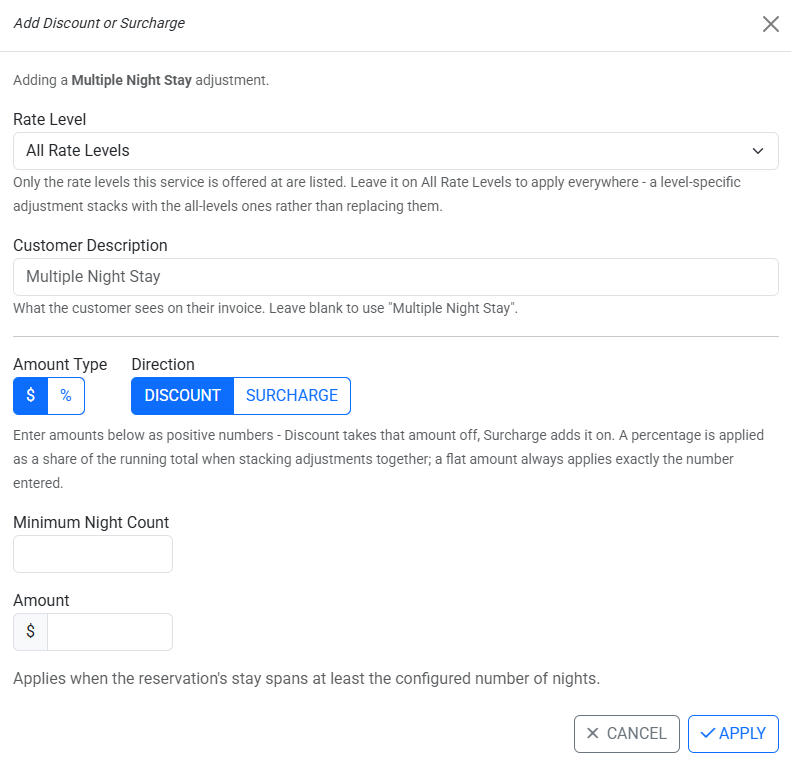 Configuring a Multiple Night Stay discount — its own fields sit below the fields every adjustment type shares.
How stacking works
The # column in the table is the literal order adjustments apply in — use the ↑ ("Apply earlier") and ↓ ("Apply later") buttons to reorder them.
Each adjustment applies to whatever price the adjustments before it left behind — a running total, not the original base price:
Enter amounts as positive numbers — Discount takes that amount off, Surcharge adds it on. A percentage is applied as a share of the running total when stacking adjustments together; a flat amount always applies exactly the number entered.
A stack of discounts can never take a price below $0. Once a line has been discounted to $0, any further discount in the stack has nothing left to remove and simply doesn't apply.
Promo codes apply last, after every discount and surcharge configured here. A promo code is worked out on the already-discounted price, not the original base price.
Separate Line Item
Some discounts and surcharges can be broken out as their own line on the invoice, instead of folded into the price of the day they apply to:
Broken out, this becomes its own line on the invoice, so the customer can see what they are being charged for. It is worked out from the running calculated price at the point it applies, but is not itself part of that running price — later adjustments will not be calculated on top of it. Left unchecked, the amount is folded into the price of the day it applies to, and later adjustments do build on it.
Use this when you want the customer to clearly see, for example, an early drop-off surcharge as its own invoice line rather than a change to a day's price.
Discount and surcharge types
"Room" below stands for whatever you call your runs (kennels, suites, spaces).
| Type | You configure | Applies when |
|---|---|---|
| Multiple Pets Booked | Minimum Pet Count, Amount | The reservation includes at least the configured number of distinct pets, across the whole reservation. |
| Multiple Pets In Same Room | Minimum Pets In {Room} Count, Amount | At least the configured number of distinct pets share the same run on that day. |
| Multiple Rooms Booked | Minimum {Rooms} Count, Amount | The reservation includes at least the configured number of distinct runs on that specific day. |
| Multiple Night Stay | Minimum Night Count, Amount | The stay spans at least the configured number of nights. |
| Ranked Pet Volume Discount | A per-pet-slot amount for each pet-count tier (2 pets, 3 pets, …) | A per-pet adjustment based on how many pets share a run together on a day, and that pet's position among them. Pets beyond the highest configured tier use the last pet's discount on that tier. |
| First Time Customer | Amount only | The customer has no prior reservation (any status other than Cancelled disqualifies them). |
| Employee Discount | Amount only | The reservation's customer is themselves an active employee at that facility. |
| Tag Based Adjustment | A customer or pet tag, Amount | The reservation's customer, or one of its pets, carries the selected tag. A customer-tag match applies to the whole reservation; a pet-tag match applies only to that pet's charges. Use this for offers like a military or loyalty discount — set up the tag under Organization > Tags first, then assign it to qualifying customers or pets. |
| Early Drop-Off Surcharge | Calculation Type, Cutoff Hour, Amount, optional Separate Line Item | Charges once, on the first billed day, when drop-off is before the facility's opening time minus the cutoff hours, or before the scheduled drop-off time minus the cutoff hours (depending on the Calculation Type you pick). |
| Late Pick-Up Surcharge | Calculation Type, Cutoff Hour, Amount, Store Opening Safety Period, optional Separate Line Item | Charges once, on the last billed day, when pick-up is judged late by the same kind of calculation as Early Drop-Off. |
| Late Pick-Up Additional Service | Service to bill, Line Description, Rate Level Selection, Calculation Type, Cutoff Hour, Store Opening Safety Period | Adds a chosen service as a new invoice line, once per pet picked up late — unlike a surcharge, it doesn't change the price of any day already reserved. Useful for billing a late pick-up as, for example, an extra daycare day. |
For Early Drop-Off, Late Pick-Up, and Late Pick-Up Additional Service, the Store Opening Safety Period gives pets collected right at opening a grace window:
Grace for pets collected first thing: nothing is charged when the pick-up falls within this many hours of the store opening that day, using the earliest opening time configured for that weekday. At 0 the charge still does not apply to a pick-up that happened before the store opened at all.
There's no separate "seasonal" discount type. A discount or surcharge only applies during the dates of the rate period it belongs to — start a new rate period to change your discounts for a season.
Testing your setup with the Price Checker
Open a service's edit page and click through to the Price Checker to try a real customer and stay against the prices and discounts you've configured — including changes you haven't saved yet. It shows a step-by-step breakdown of every discount and surcharge that applied, and the price before and after each one, so you can confirm the stack behaves the way you expect before it reaches a real invoice.
The Price Checker never books anything or changes stored prices unless you explicitly choose to save it.
Editing an existing discount or surcharge
Editing and saving a service's discounts and surcharges replaces that rate period's entire set — it isn't additive. If you remove a row and save, that discount stops applying going forward; it does not come back on its own.
Conclusion
Discounts and surcharges let you build offers like multi-pet, loyalty, tag-based, and early/late pricing on top of a single base price, instead of a separate rate for every combination. They apply in the order you set, each one working off the running total left by the ones before it, are capped so a stack can't take a price below $0, and always give way to a promo code applied last. Use the Price Checker to confirm the stack does what you expect before it reaches a customer's invoice.
Related
- Services & Rates — base prices and rate periods.
- Runs & Rate Levels — rate levels a discount or surcharge can be scoped to.
Still stuck?
Our team is happy to help. Reach out and we'll get you back on track.
Not a Petsoft customer yet?
These are the same guides our customers use. Prices are on our site, and the demo is a working account with sample pets and bookings already in it.