Setting Your Prices
You can set up Petsoft to match your business. Petsoft has no fixed pricing rules. You create your own services, prices, and weight categories — boarding, daycare, grooming, baths, and add-ons are all set up the same way, as Facility Services.
Go to Services in the left navigation. This page has five tabs:
Rate Levels · Runs · Facility Services · Fees · Daycare Availability
You need the Manage Facility Services permission to see Services in the navigation. The same permission also controls saving and deleting.
Where to enter each price
Read this section before you start.
| What you are pricing | Use | Weight-based? |
|---|---|---|
| Boarding, daycare, grooming, baths, add-ons — any service | Facility Services | Optional, per service |
| Treats, toys, retail | Products | No |
| Late checkout and other flat charges | Fees | No |
Rate Levels are different from all of these. Rate Levels are the tiers you use to sort runs, such as Regular and VIP. Rate Levels have no price of their own — a service's price can vary by the rate level of the run a pet is assigned to. See Runs & Rate Levels.
How rate periods schedule price changes
Every Facility Service stores its prices and discounts in a rate period. A rate period is a dated range that shows when those prices apply. You do not overwrite a current price. Instead, you start a new rate period on the change date, and you edit the prices there.
A new rate period copies the prices and discounts from the period before it. You only need to change what's different. Existing invoices and captured deposits do not change when a rate period changes.
On the service's edit page, the Rate Period dropdown lists every period for that service, newest first. Pick one to see its prices as of that date. If a period has no price configured for some of its dates, or two periods overlap, the dropdown flags it with a warning icon so you can fix it.
A rate period that has already ended shows its prices and discounts read-only. Editing an already-billed period should go through a deliberate change, not a casual price tweak.
If you save a rate period with every price row deleted, Petsoft asks you to confirm, then removes the period entirely — along with any discounts and surcharges configured on it. A service can't be reserved on dates with no price.
Setting up a service
Go to Services > Facility Services. Click Add New Facility Service, or the pencil icon on an existing one.
 The services list. Click the pencil icon to open a service and edit it, including its prices and discounts.
Fill in the fields below:
| Field | What it does |
|---|---|
| Name / Description | What the service is called. |
| Department | Groups the service's revenue for reporting. |
| Is Primary Service | "Determines whether this service can be the main service of a reservation." |
| Is Trial Service | "Determines whether this service is allowed for use in trial reservations." Only shown for primary services. |
| Is Reservation Addon | "Determines whether or not the pet parents can select this service as an add-on." |
| Delivery Schedule | "How this service will be scheduled through the course of a reservation." Required for add-on services. |
| Scheduling Type | "Controls how users are able to reserve this service, including reservation times as well as employee and run assignments." Required for primary services — this is what makes a service behave like boarding (multi-day), daycare (single day), or a timeslot appointment. |
| Duration | Minutes. Minimum is 15. Only applies to services scheduled by timeslot. |
| Taxable / Is Pet Dependent | Whether tax applies, and whether the item needs a pet before staff can add it. |
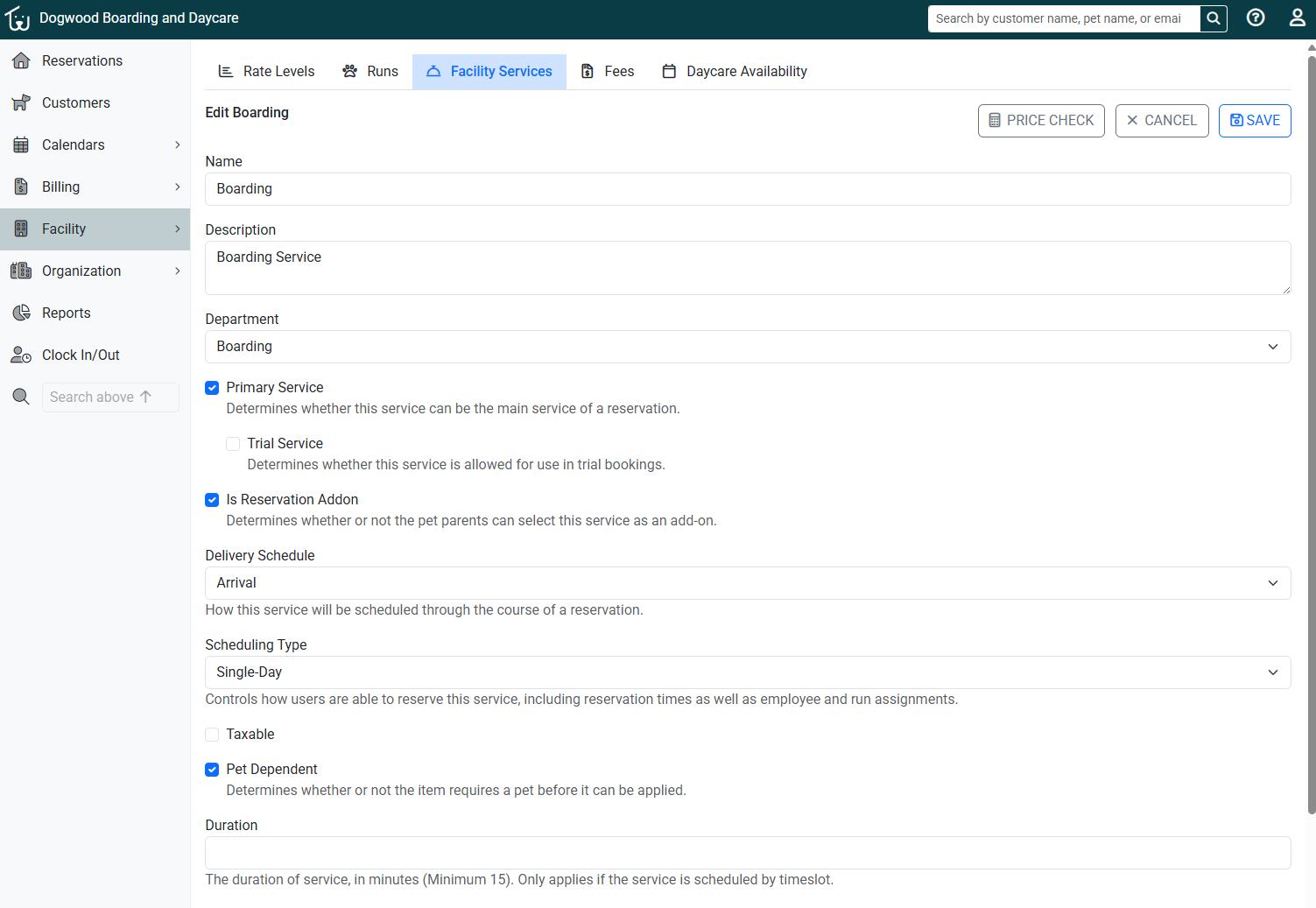 Editing a Boarding service — Boarding and Daycare are ordinary Facility Services, distinguished by their Scheduling Type.
Base prices, and weight-based pricing
Below the service's fields, the Base Prices table sets what the service costs before any discount or surcharge is applied.
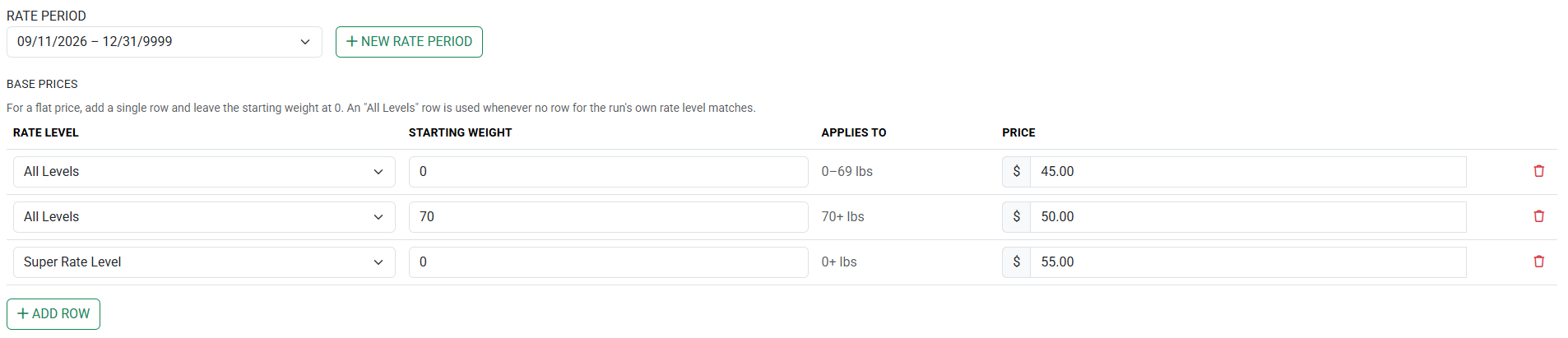 A facility service with pricing based on weight and rate level: $45 starting at 0 lbs, $50 starting at 70 lbs. A reservation with any pet using Super Rate Level will cost $55, regardless of weight
- Flat price: Add one row, and leave the starting weight at 0.
- Weight-based pricing: Click Add Row for each tier. Give each row a Starting Weight and a Price.
- By rate level: You may choose between a specific Rate Level, or All Levels. An "All Levels" row is used whenever no row matches the run's own rate level.
Each row applies its price starting at its starting weight, up to the starting weight of the next row. You can set any number of tiers.
You define the tiers. Petsoft does not include fixed weight categories such as small, medium, or large. You set the weights and the prices.
Discounts and surcharges
Below Base Prices, the Discounts and Surcharges table lets you layer multi-pet discounts, loyalty and tag-based discounts, and early/late surcharges on top of a service's base price — and stack any number of them together.
 Three stacked adjustments: a First-Time Customer discount applied first, then a Ranked Pet Volume Discount, then a Multiple Night Stay discount.
Click Add Discount or Surcharge to configure one. Each row shows its position (#), the adjustment, the rate level it applies to, and the amount — a surcharge shows in red with a leading +. Use the ↑ / ↓ buttons to reorder how adjustments apply; nothing is saved until you save the service.
This is enough setup for most businesses. For the full list of discount and surcharge types, exactly how amounts stack, and the rules for combining multiple discounts, see Discounts & Surcharges.
Before saving, use the Price Checker (on the service's edit page) to try a real customer and stay against your configured prices and discounts, without writing anything until you're ready.
Two rules to remember
- New services apply to future rate periods too. Adding a new Facility Service adds the service to the current rate period and any future rate periods.
- Active reservations restrict changes to a service. If a service has at least one active reservation, most fields become unavailable — only the name, description, and add-on setting can still change. The Delete button is also unavailable while the service has an active reservation. If you edit a price in a rate period that has active reservations, Petsoft warns you that the change affects those reservations.
Deleting
- Deleting a service removes it from all rate periods. You cannot undo this. The delete button is at the bottom of the service's edit page, and is unavailable if the service has an active reservation.
- Deleting a rate period is also permanent, and removes its discounts and surcharges along with its prices.
Any reservation deposits already captured keep their existing values, even after a price or discount changes.
Related
- Runs & Rate Levels — set these up first.
- Discounts & Surcharges — the full reference for stackable pricing adjustments.
- Fees — late checkout and other flat charges.
- Daycare availability — the number of daycare spots you sell.
Still stuck?
Our team is happy to help. Reach out and we'll get you back on track.
Not a Petsoft customer yet?
These are the same guides our customers use. Prices are on our site, and the demo is a working account with sample pets and bookings already in it.