Release 118
Released November 11, 2026
This release gives owners and managers a clearer view of the business: revenue you can explore, a scorecard on the Organization home page, and a real calendar for employee schedules. Grooming and Training get their own pages, search reaches everything from one box, and organizations can restyle Petsoft to match their brand.
Highlights
See exactly where your revenue comes from
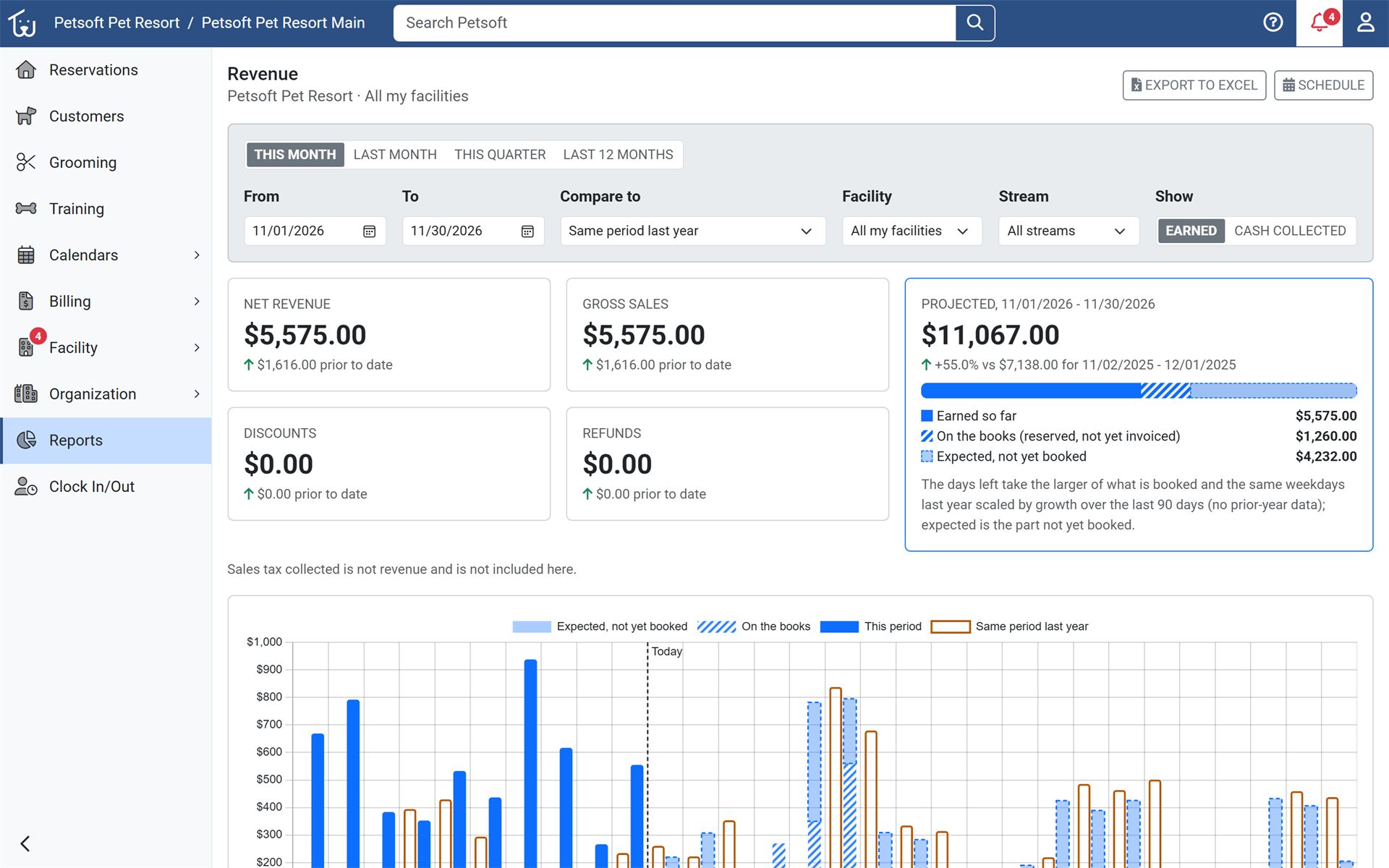
The new Revenue Explorer shows revenue by service, facility, item, customer or payment method for any date range. Compare periods, see where the current period is projected to land, drill down to the invoices behind any number, and export to Excel. Pages load quickly even for large organizations and show when their totals were last updated, and you can schedule a daily or weekly email with a link to your revenue export. Open Reports and choose Revenue Explorer.
Your business at a glance
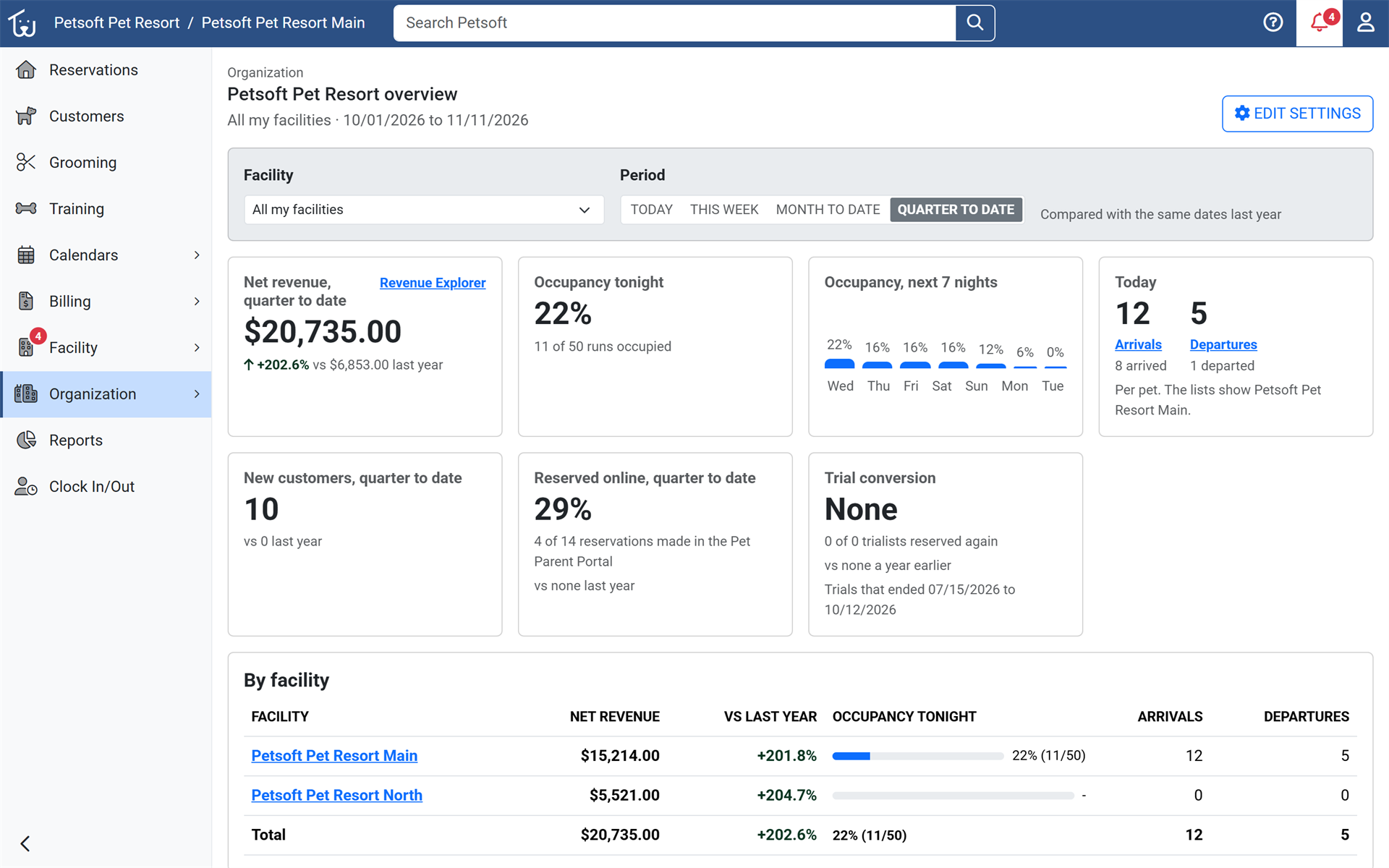
The Organization home page is now a scorecard of revenue, occupancy, arrivals and departures, new customers, online reservations and trial conversion, each compared with last year. Owners see how the business is doing the moment they sign in. Open the Organization home page.
Schedule your team on a real calendar
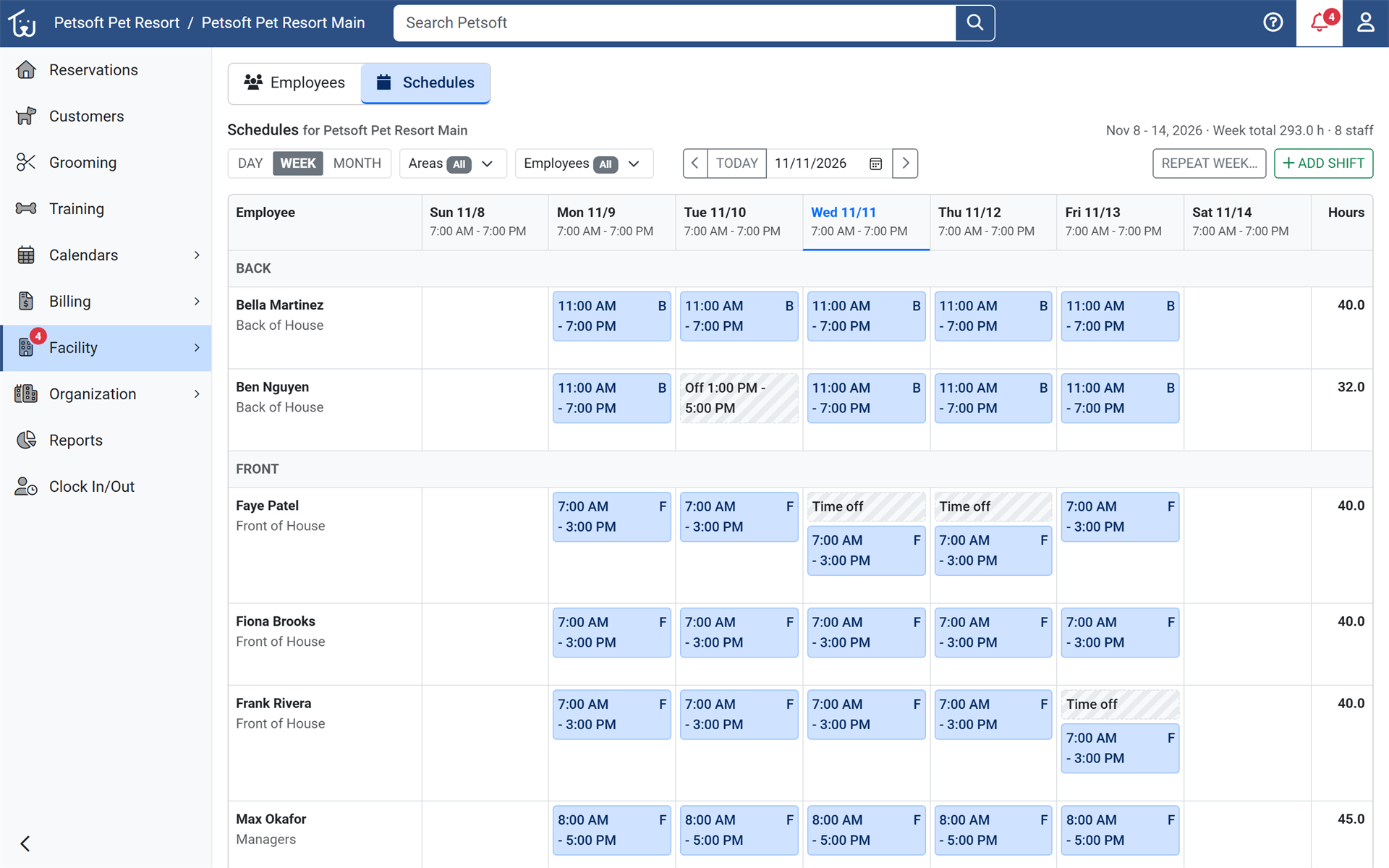
Employee schedules are now a Day, Week and Month calendar. Staff add, edit, drag and resize shifts in place and review clock punches beside them. Employees can work split and overnight shifts, time off blocks scheduling and online booking, and repeating a week shows a preview of the shifts it will add and the days it skips. Open Employees and choose Schedules.
A home for Grooming and Training
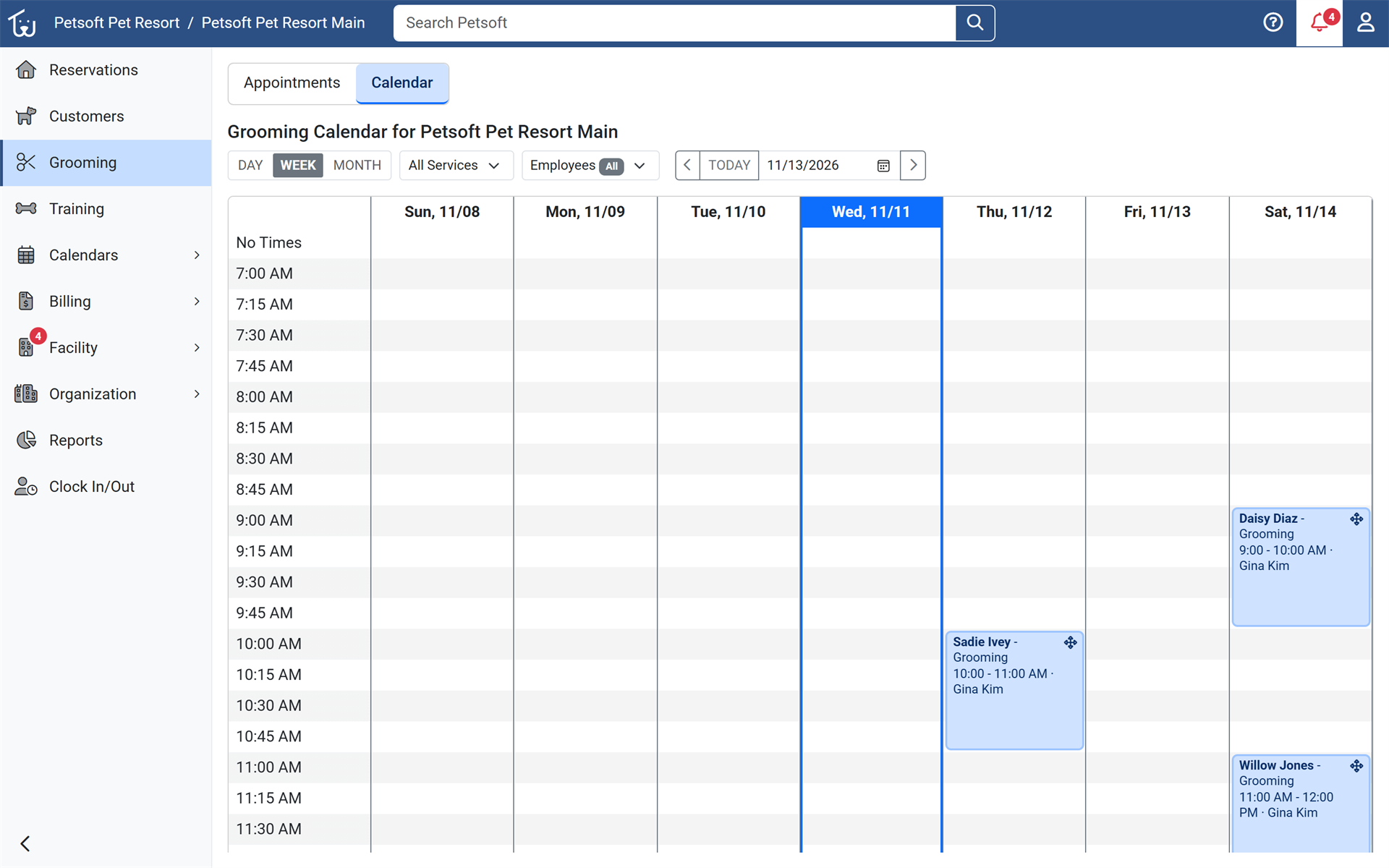
Grooming and Training each have their own page in the office menu, with summary counts and a calendar of only that team's appointments or sessions, including a Month view. Drag an appointment to a new time or groomer: conflicts and price changes are shown first, and you can email and text the customer about the change. Choose Grooming or Training in the office menu.
Learn more about grooming appointments
Reserve the whole family in one pass
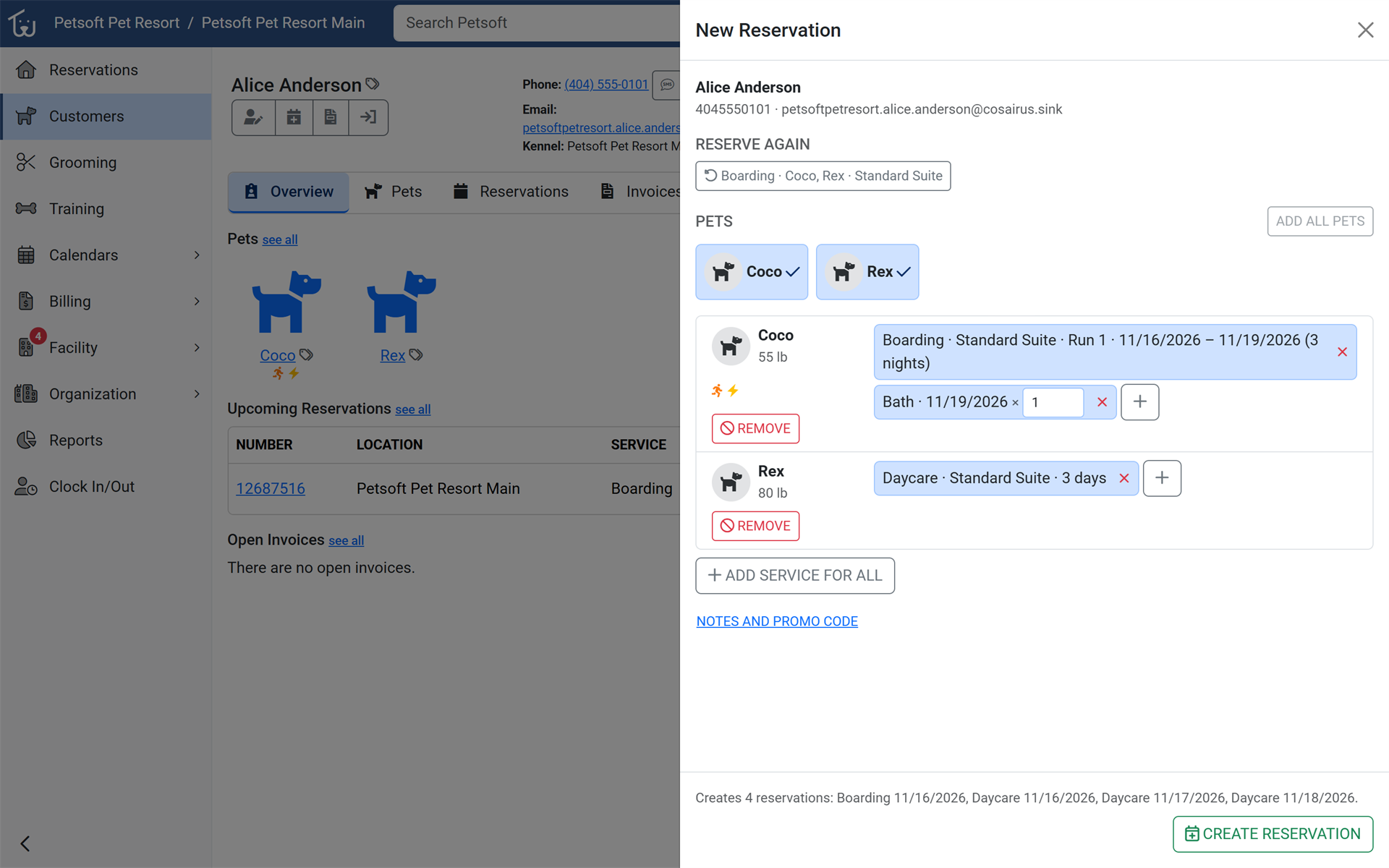
An opt-in New Reservation drawer reserves several pets at once, each with its own services and add-ons, and can check them in right away. Staff finish a family's reservation in one pass instead of one pet at a time. Turn on Enable Preview Features in Rules, then choose New Reservation.
Find anything from one search box
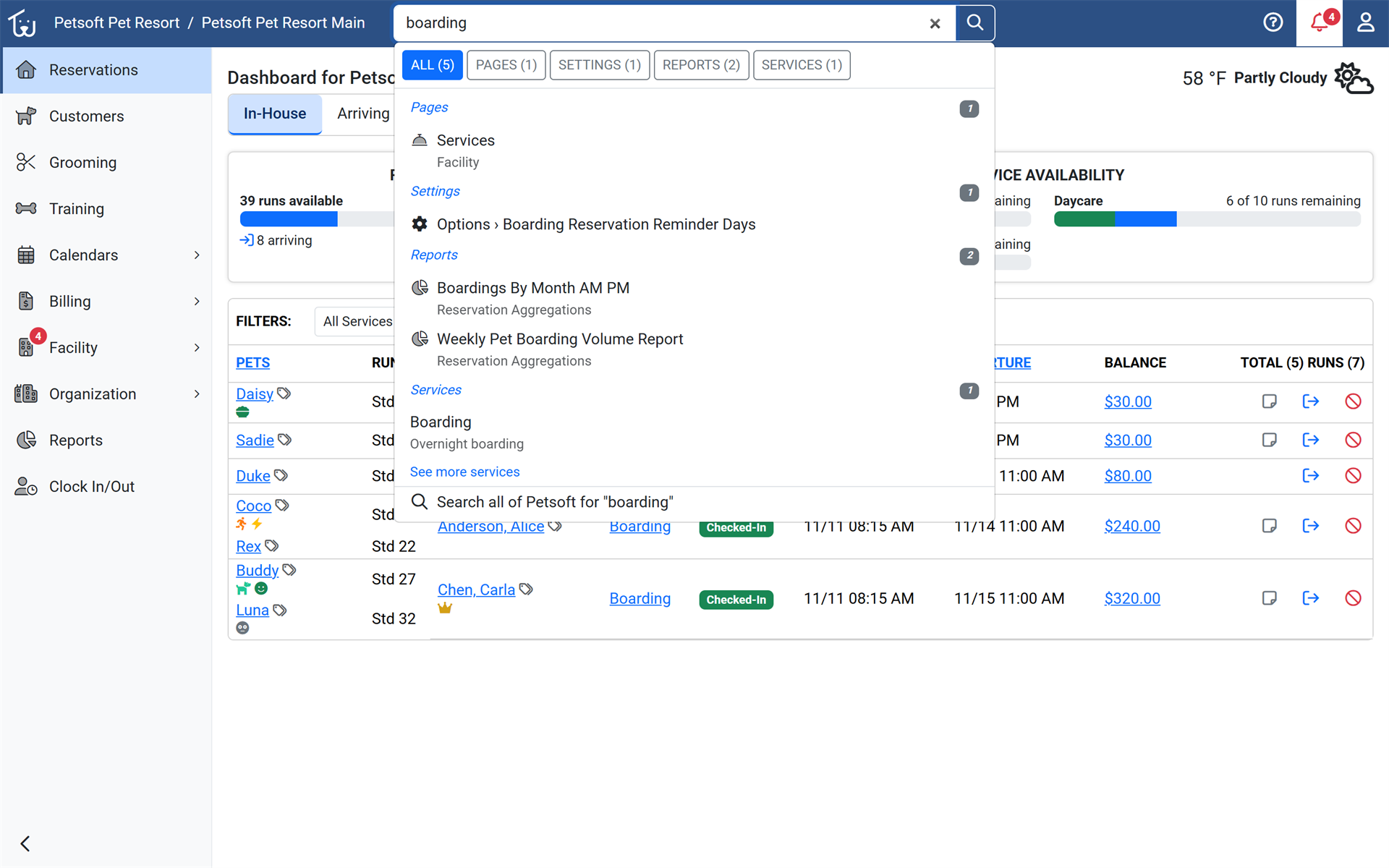
One search box at the top of every Office Portal page now finds customers, reservations, invoices, services, products, employees, training classes, reports, pages and settings. Suggestions are grouped by type, the results page has a tab for each type, and Ctrl+K jumps to the box from anywhere. Reports appear only for employees who are allowed to run them.
Track cash tips and report on them
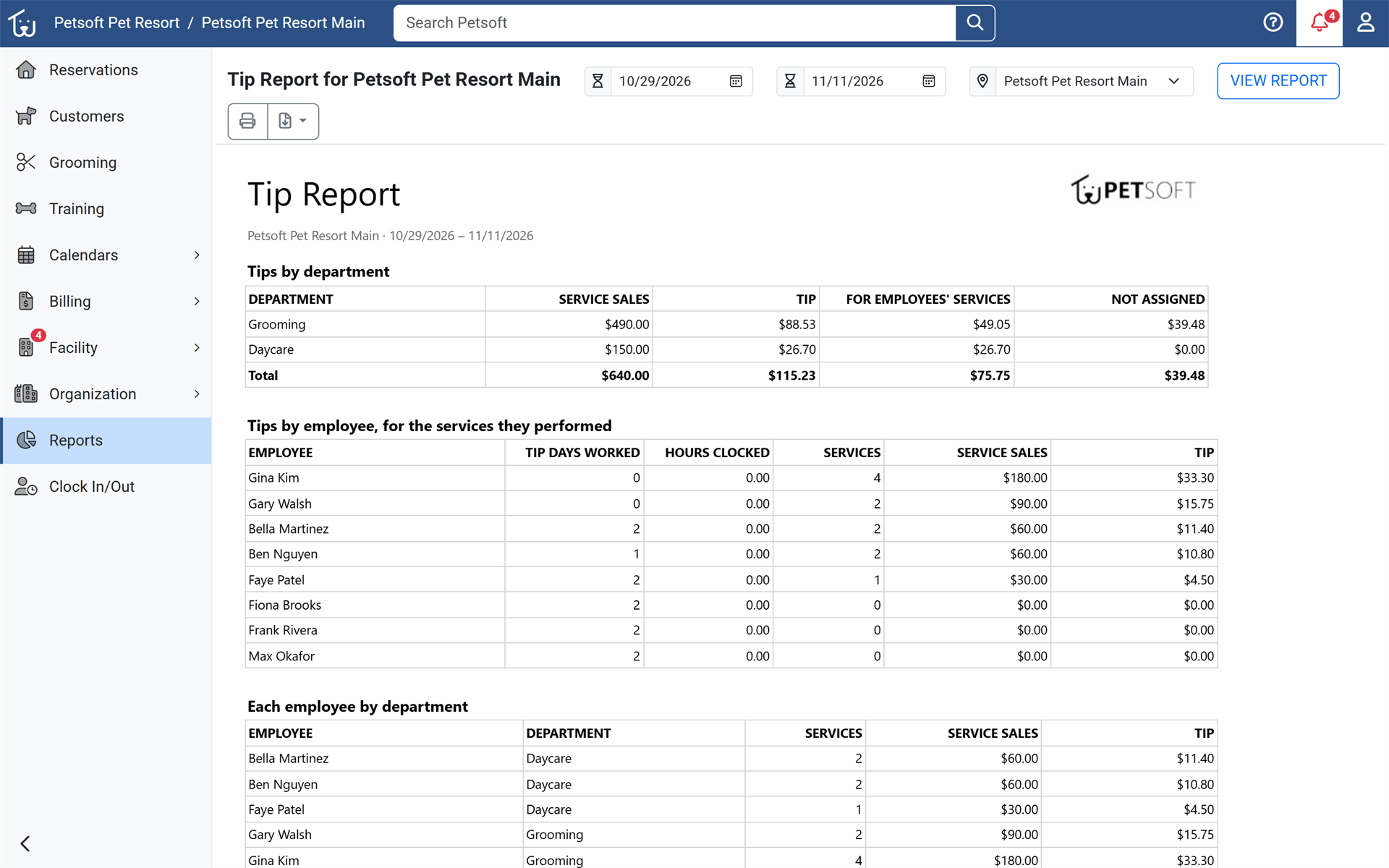
Facilities can record a tip when taking a cash payment, and a new Tip Report shows tips by department, employee and day. Paying staff their tips takes no spreadsheet. Turn on Track tips in organization settings, then open the Tip Report.
Make Petsoft look like your brand
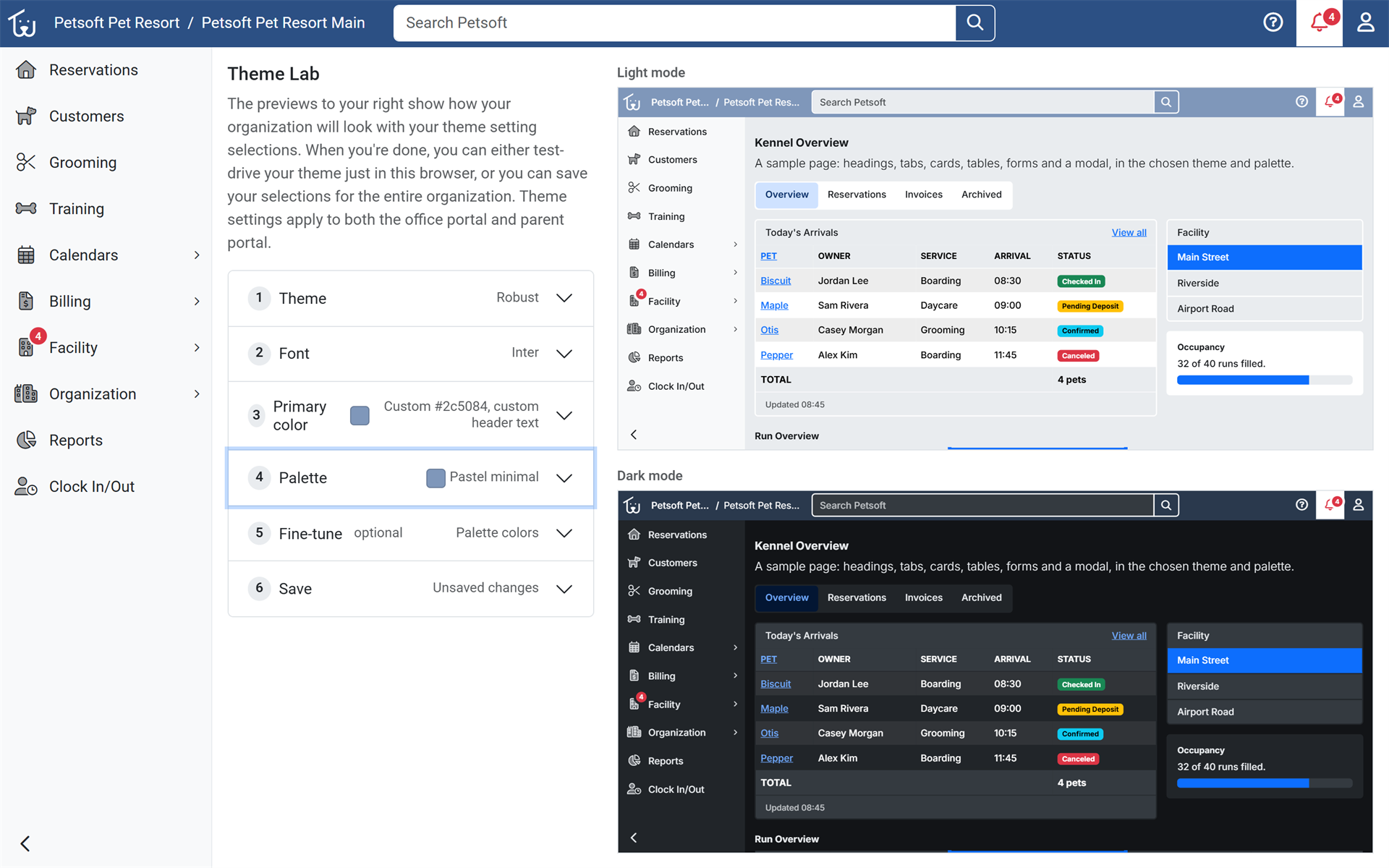
The new Theme Lab lets account owners with Custom Branding choose a theme, font and color palette for the whole organization. Staff and pet parents see a portal that looks like the facility's own. Open the Theme Lab from organization settings.
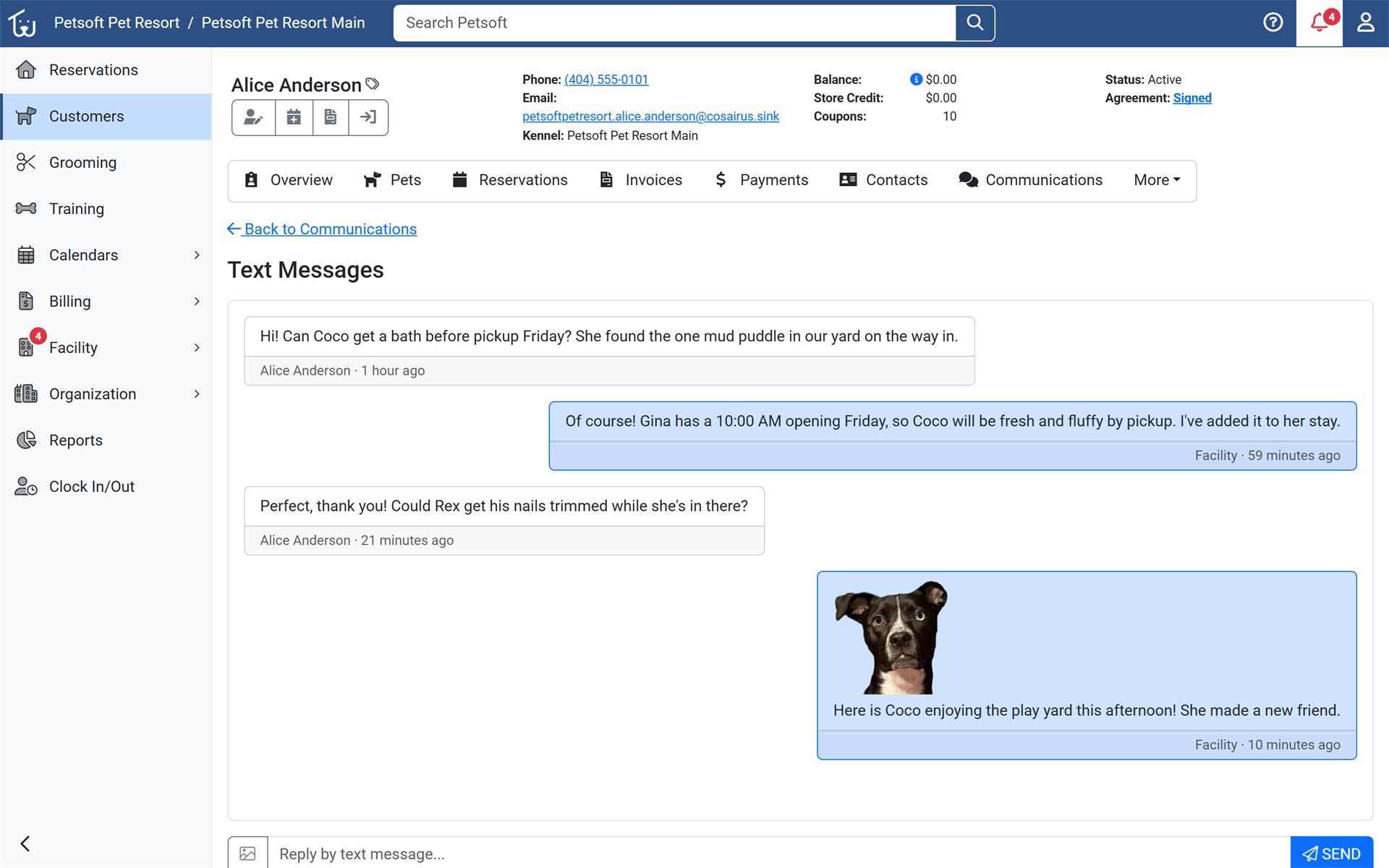
Send photos by text
Staff can attach photos to texts sent to pet parents, from a customer's Text Messages page or the Customer Messages inbox. Sent photos show in the conversation and on the Communications tab. Open Customer Messages or a customer's Text Messages page.
Update rates at every facility at once
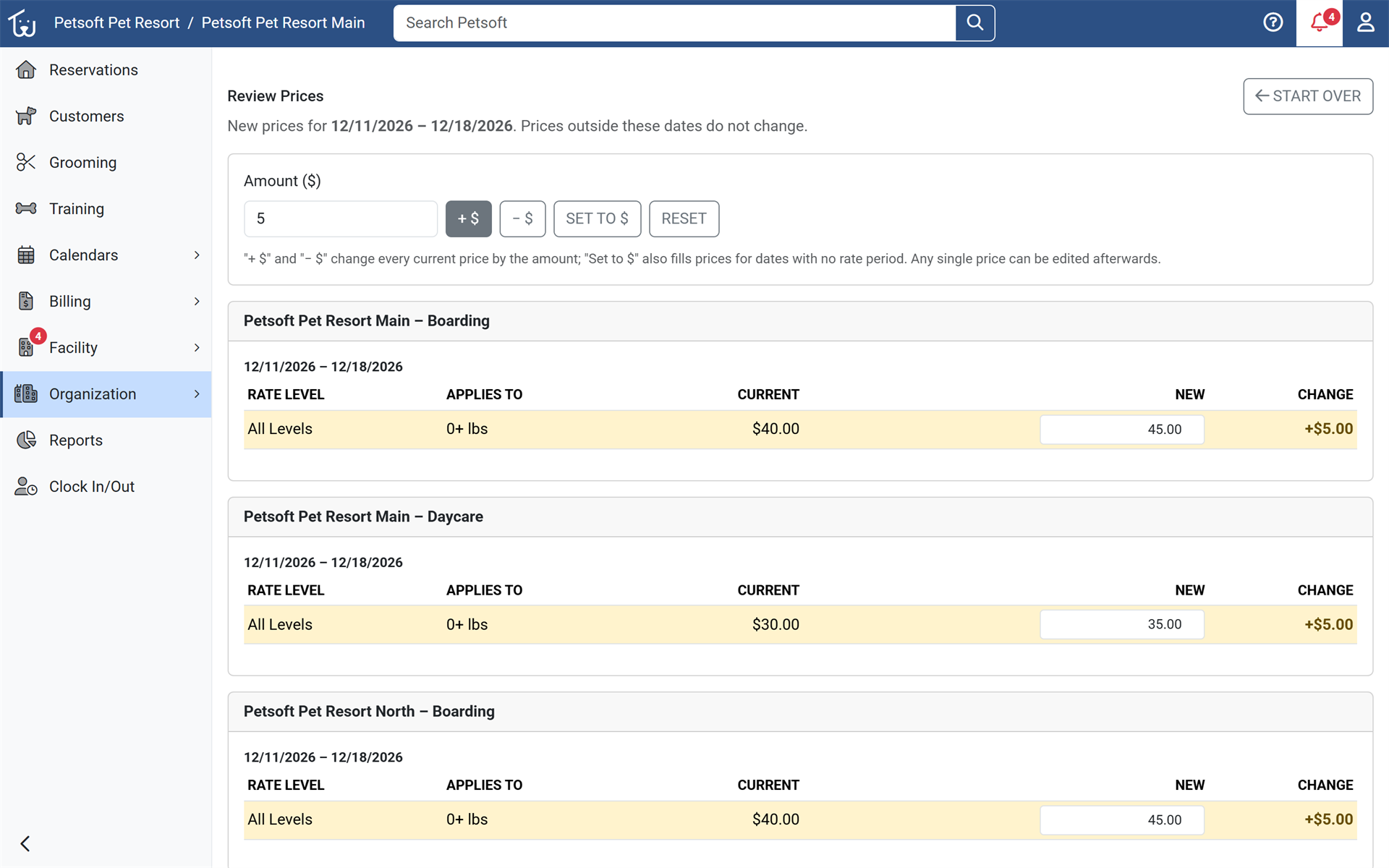
Account owners with more than one facility can change service rates for a date range at several facilities in one step. Holiday and seasonal pricing no longer means repeating the same edit at every location. Open Bulk Rate Editing from the services menu.
Learn more about services and rates
Revenue across all your organizations
Companies that own several organizations can see revenue across all of them in one view, by organization, facility and service. Multi-brand operators get one set of numbers instead of stitching reports together. The Petsoft team sets this up on request.
More improvements
- The Dashboard reservation list now shows one row per reservation, listing each pet with its own space. Click anywhere on a row to open the reservation, and the list is ordered by each reservation's next arrival or departure. Availability bars are more compact.
- A customer's Emergency Vet, with a click-to-call phone number, now appears in the header of every customer page, and the customer Overview lists their emergency contacts.
- A Text button now appears beside a customer's phone number when the customer can be texted.
- Account Owners can rename their organization from Organization Settings. The new name shows in the portals and in the emails, text messages and receipts sent from then on.
- Organization logos are uploaded directly to Petsoft instead of linked from another website, so they display reliably on branded sign-in pages and in emails. Existing logos are moved over automatically.
- New colorblind-friendly color options in My Petsoft replace the green and red on buttons, badges and messages for staff and pet parents.
- Pending review pages now match Customer Search, with card, row and table views, a vaccination table, and a document preview that opens PDFs and images full screen. Customer Search and Pending Review group each result's actions into one tidy button set.
- Pet parents who upload vaccination records see a preview of each file, can remove one uploaded by mistake, and see their pet's vaccinations marked Pending Review until the facility reviews them. Vaccination statuses now show as colored badges.
- Pet parents signing up can choose AI Assistants when asked how they heard about a facility, and these sign-ups appear in the Marketing Source Report. A facility with one location is selected automatically.
- The Daycare Availability and Settings calendars now match the Service Calendar's look, and the Service Calendar opens on week view and remembers your choice of day or week.
- Tutorials can be paused and resumed from a bottom bar and show step progress, and picking a customer from the search suggestions now moves a tutorial on to its next step.
- A new organization rule, off by default, chooses whether checking a pet in from the Dashboard opens the In-House tab or stays on the current tab.
- New organizations can choose, while finishing setup, whether pet parents can sign up, whether customer messaging is on, and whether trials and pet review are required.
- Switching organization from the scorecard, Reports list or revenue pages keeps you on that page.
- Notification counts have a cleaner look, show 99+ for large numbers, and use red only for items that need action. On edit pages with tabs, Save now sits beside the tabs.
- The Certificate Update Agent has a Send logs to Petsoft Support option, so Support can see card terminal software logs from a front-desk computer without asking you to find and attach them.
- The mobile app now shows a pet with a never-recorded required vaccination as Missing instead of Expired.
- Sales Revenue and Customer Revenue reports now point to the new Revenue Explorer ahead of their retirement in an upcoming release.
Fixes
- Fixed the cancellation refund amount shown to pet parents, which could be wrong depending on the time of day a boarding reservation was canceled. The Cancel Stay page now quotes the refund using your facility's local time.
- Fixed a facility added after sign-up being unable to post invoices or take payments.
- Fixed prices, the Reserve page date and facility time zones shifting to the next day for evening work, and the nightly cleanup of expired reservation holds.
- Fixed Add Food on invoices so it is available on the last day of a house food price period and uses the price in effect on the facility's date.
- Fixed the Daycare Availability calendar so day numbers and headers line up across a week.
- Fixed dropdown lists being cut off in Chrome on wide screens.
- Fixed the Bulk Cancellation dialog so choosing Cancel leaves the selected reservations as they were.
- Fixed the Cancel Reservations button on the Cancel Multiple Reservations page so it can be tapped on a phone.
- Fixed the Dashboard failing to load when switching into an inactive organization with no subscription plan on record.
- Fixed the SMS page showing an error page, instead of a clear message, for organizations that have not set up SMS.
- Fixed a merge request between an employee and a customer account that could not be sent when the employee had no contact email on file.
- Fixed the unread marker in Customer Messages, the add-on quantity box on New Reservation, and appointment length showing on Boarding and Daycare in the Pet Parent Portal.
- Fixed pet parents seeing "run" instead of your organization's own space term (such as Suite or Condo) in the Board Separately message.
Security and reliability
- Strengthened Office Portal security so staff can only view and change records that belong to their own organization, and one organization can no longer delete or change another organization's records. The saved email (SMTP) password is no longer shown on the email settings page.
- Employees without the Manage Facility Services permission can no longer open or change Rate Levels, Spaces, Facility Services and Price Check by entering the page address directly.
- Submitting the same card payment twice on an invoice, such as from two tabs, is now refused the second time, so a card is not charged twice.
- Organizations on a plan without text messaging can no longer search for or buy a texting number, or turn texting on. Turning texting off is still allowed.
- Confirmation prompts across staff and Pet Parent Portal pages now use one consistent Petsoft dialog.
- Card-terminal sales made with a phone or watch wallet are recorded even when the wallet reports no card expiration.
¿Sigue atascado?
Nuestro equipo está encantado de ayudarle. Escríbanos y le ayudaremos a continuar.
¿Todavía no es cliente de Petsoft?
Estas son las mismas guías que usan nuestros clientes. Los precios están en nuestro sitio y la demostración es una cuenta real, con mascotas y reservas de ejemplo ya cargadas.